BULLETIN WW / SIT-1 REV 1.0 AIRCRAFT F-15C EAGLE (FLAMING CLIFFS) DISPLAY LOWER-LEFT MPCD
DCS World · Flaming Cliffs F-15C

F-15C SIT

The Flaming Cliffs F-15C gets the display it never had: a SIT page on the lower-left MPCD with your radar and the datalink picture, threat rings, your route and bullseye, missiles in flight with time to impact, plus menu pages for countermeasure programs, combat jettison, SRS radio presets and data cartridges.

A tech mod for the stock F-15C. Needs DCS World with the F-15C from Flaming Cliffs, nothing else. It sits in Saved Games and leaves ED's files as they are, apart from a marked block in the F-15C's controls file (its keybinds) that UNINSTALL takes out again. SRS is optional, for the radio page.

SIT page in the cockpit: compass rose, own radar scan lines, datalink contacts around the ownship and a red SA-11 threat ring
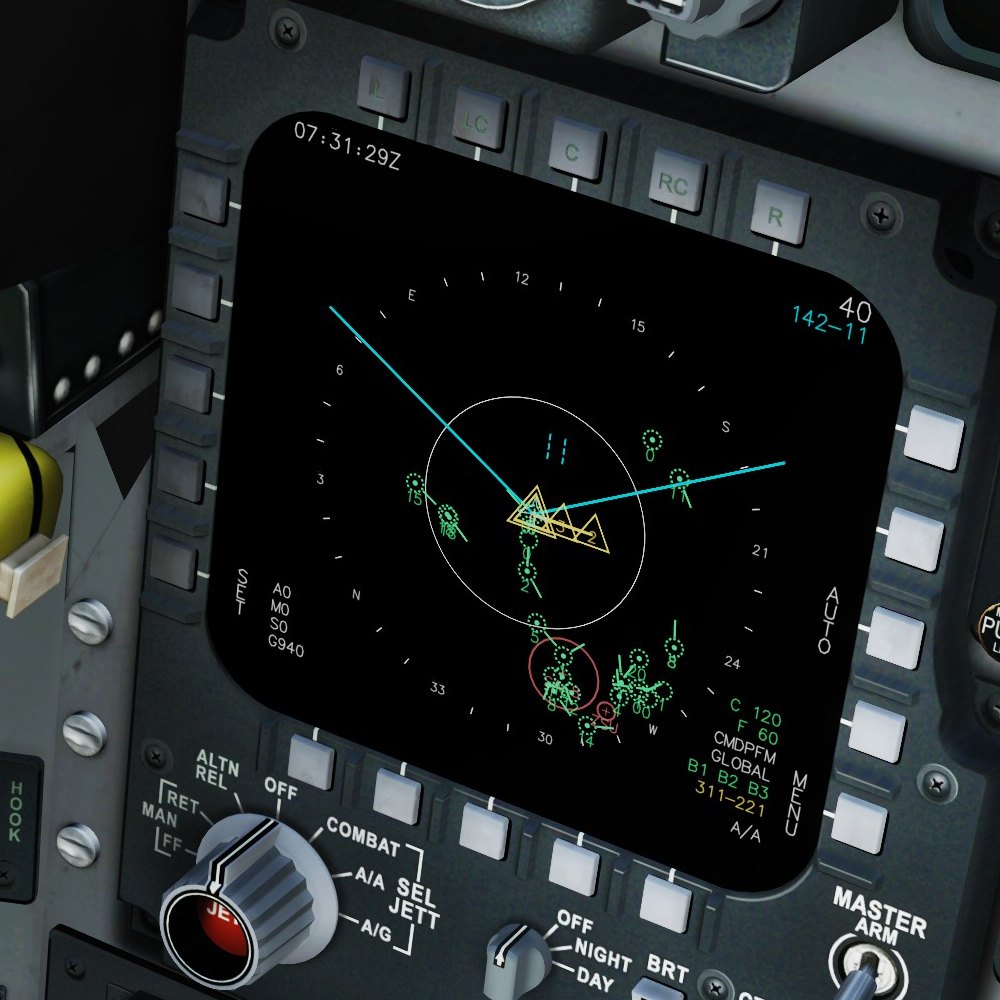
SL. 1SIT page, busy server, 40 NM
14
MPCD pages, plus self test
5–240NM
SIT range, centred and decentred steps
40
contacts on the page: radar, AWACS, flight, datalink
2×20
UHF presets, tuned in SRS from the cockpit
6
CMDS programs you can edit in flight
1
offline HTML file: the DTM Planner

The pages

SL. 2 – SL. 11
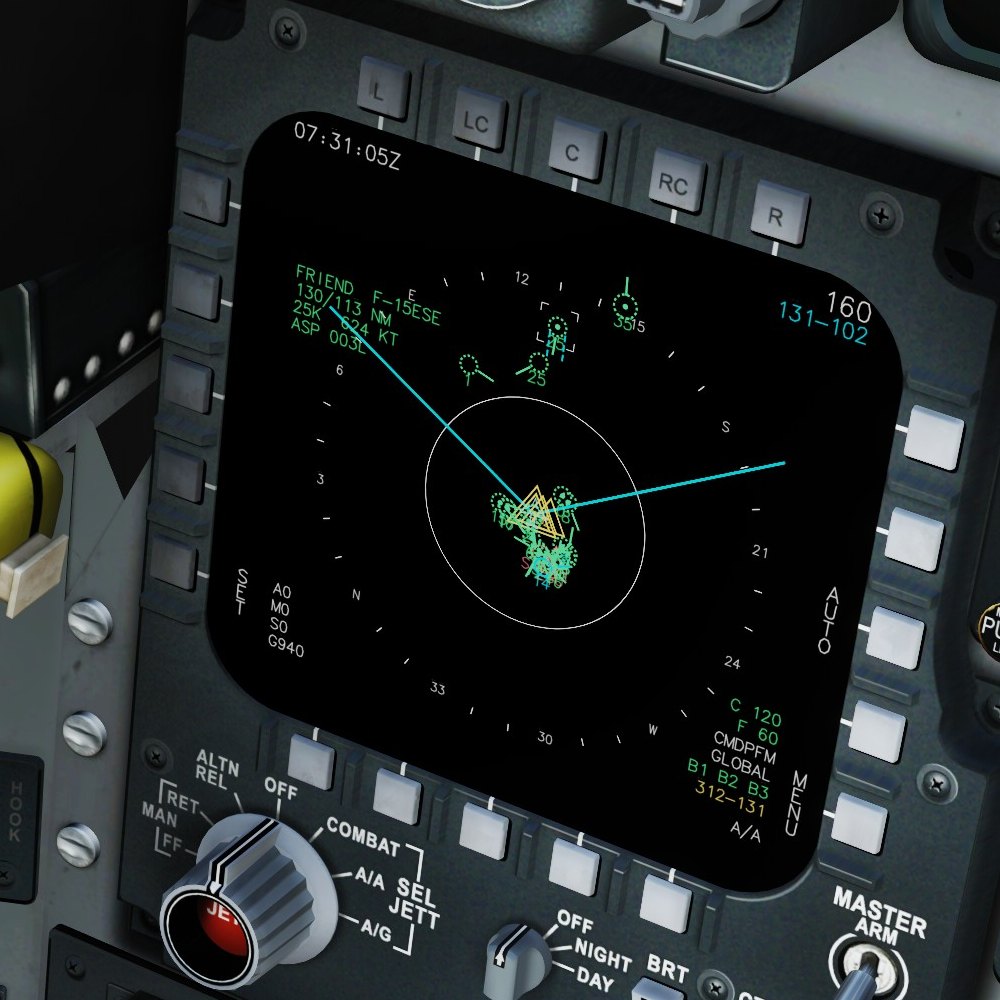
SIT page at 160 NM with the cursor on a friendly F-15E: its data block top left, radar scan lines, contacts and own flight
SL. 2SIT page, cursor on a contact

The tactical picture

A heading-up picture around your jet, in the real SIT page's colours and symbols. Your own radar's contacts are solid, datalink contacts dotted: green friendlies, red hostiles, white unknowns, your flight in cyan with its number.

  • Datalink from AWACS, EWR, ships and datalink fighters, with sensor range, radar horizon and terrain taken into account.
  • The radar's scan edges and its cursor follow the VSD live; castle up gives the cursor to the SIT page.
  • Put the cursor on a contact for its data block: identity, bearing and range, altitude, speed and aspect.
  • On servers that block the datalink export, the server's EWR picture reports fill the page instead.
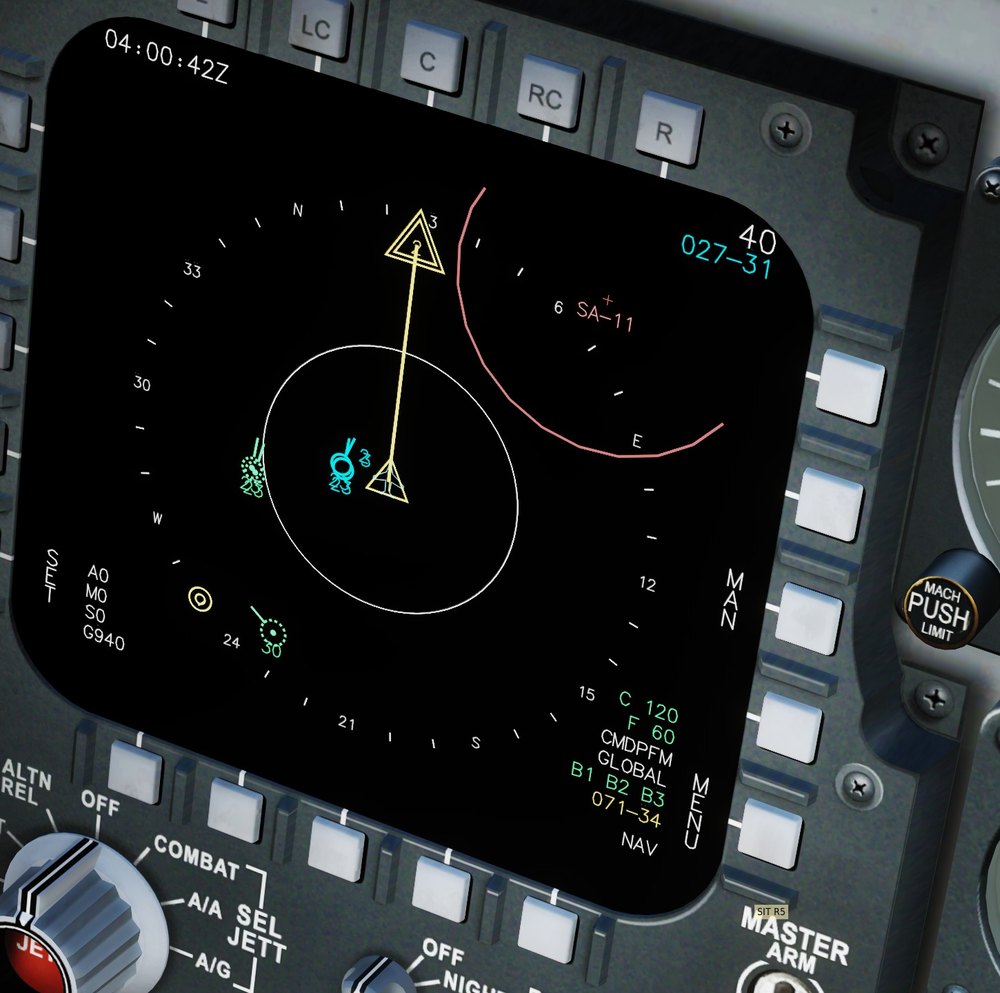
SIT page at 40 NM: the route to the active steerpoint, a red SA-11 ring, the bullseye and a flight member in cyan
SL. 3Route, SA-11 ring and bullseye

Route, threats and bullseye

The route from the mission or your cartridge with the active steerpoint marked, enemy SAM sites as rings once a friendly sensor has seen them, the bullseye, and the mission's drawings.

  • Range like the real page: 5 to 160 NM centred, 7 to 240 NM decentred, AUTO follows the radar's range.
  • EXP zooms 10 NM around the cursor, F5 frames your formation.
  • Your missiles in flight with a line to the target and the time to impact; mark points at the cursor.
  • Five declutter steps from FULL to MIN, on a keybind.
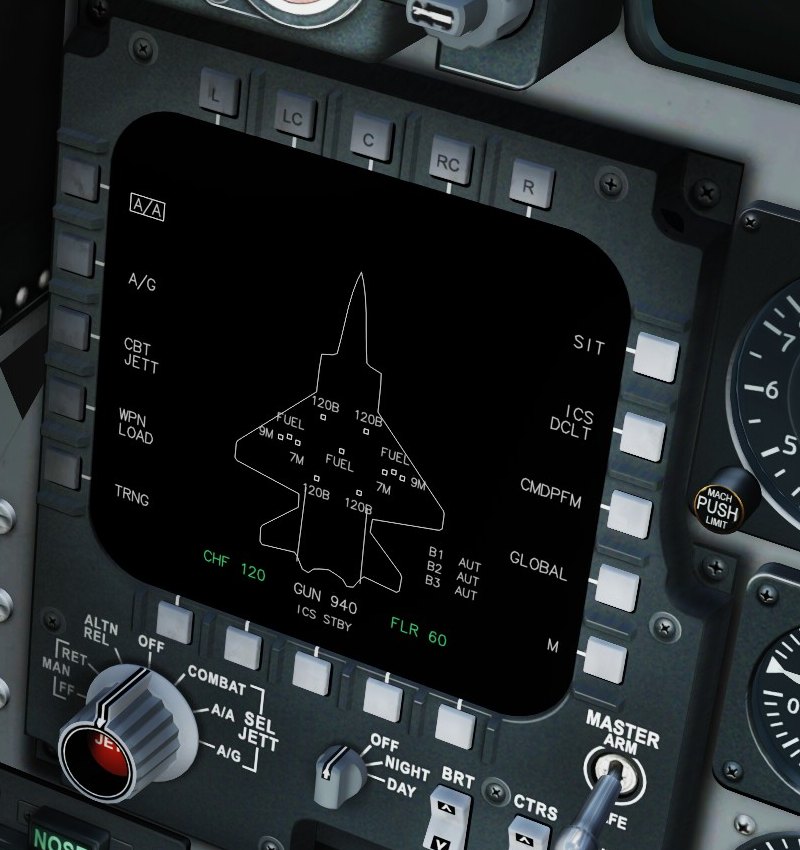
A/A page: aircraft outline with the stores on each station, chaff and flare counts, gun rounds and ICS bands
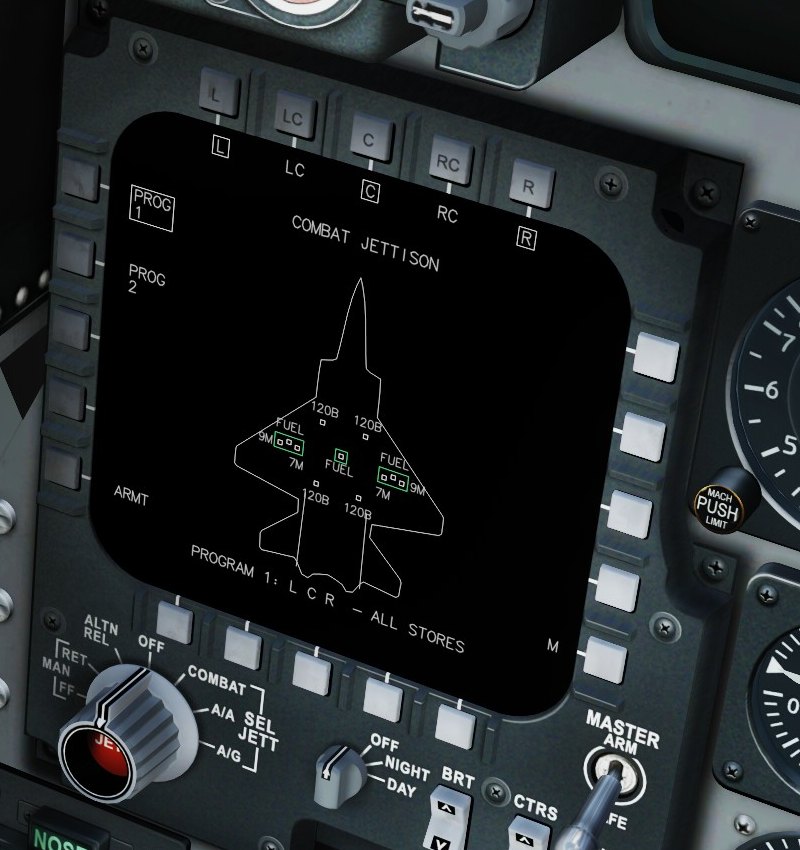
Combat jettison page with program 1 selecting the left, centre and right stations
SL. 4A/A · SL. 5Combat jettison

Stores and jettison

The A/A page shows every station as it is loaded, chaff, flares and gun rounds, the jammer's state and your selected countermeasure program. Two combat jettison programs pick the station groups; one keybind drops them.

Flaming Cliffs drops either the tanks or all stores: the page tells you which one a program will do.

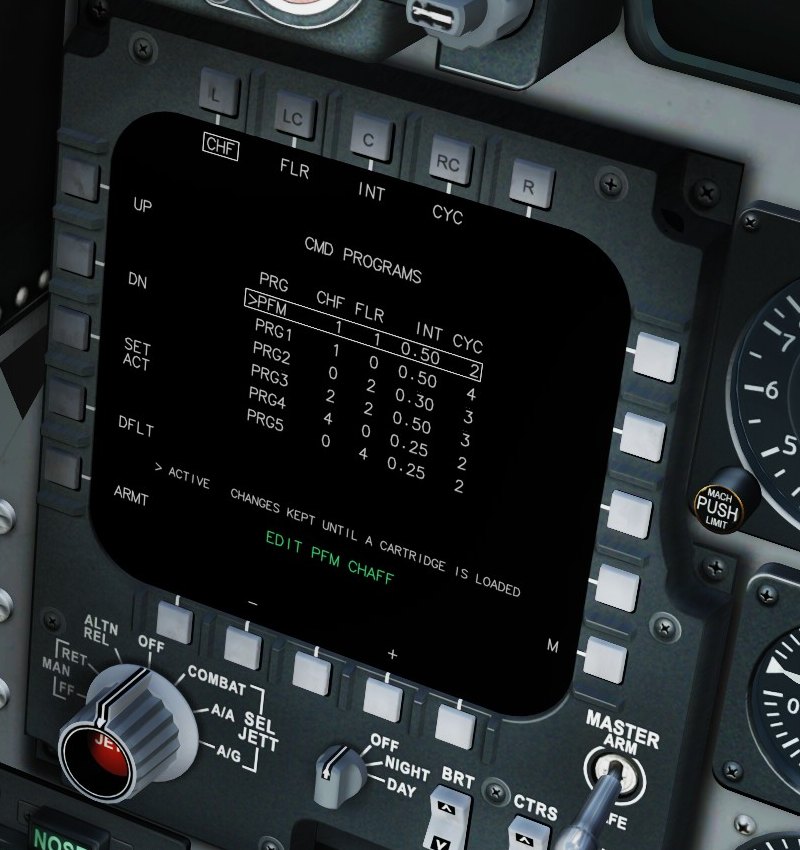
CMD PROGRAMS page: six programs with chaff, flares, interval and cycles, the active one marked
SL. 6CMD programs

Countermeasure programs

Six programs (PFM and PRG1–5) with chaff, flares, interval and cycles, edited right on the MPCD. Bind CMD - Dispense and CMD - Next program to your HOTAS and the jet runs the program for you.

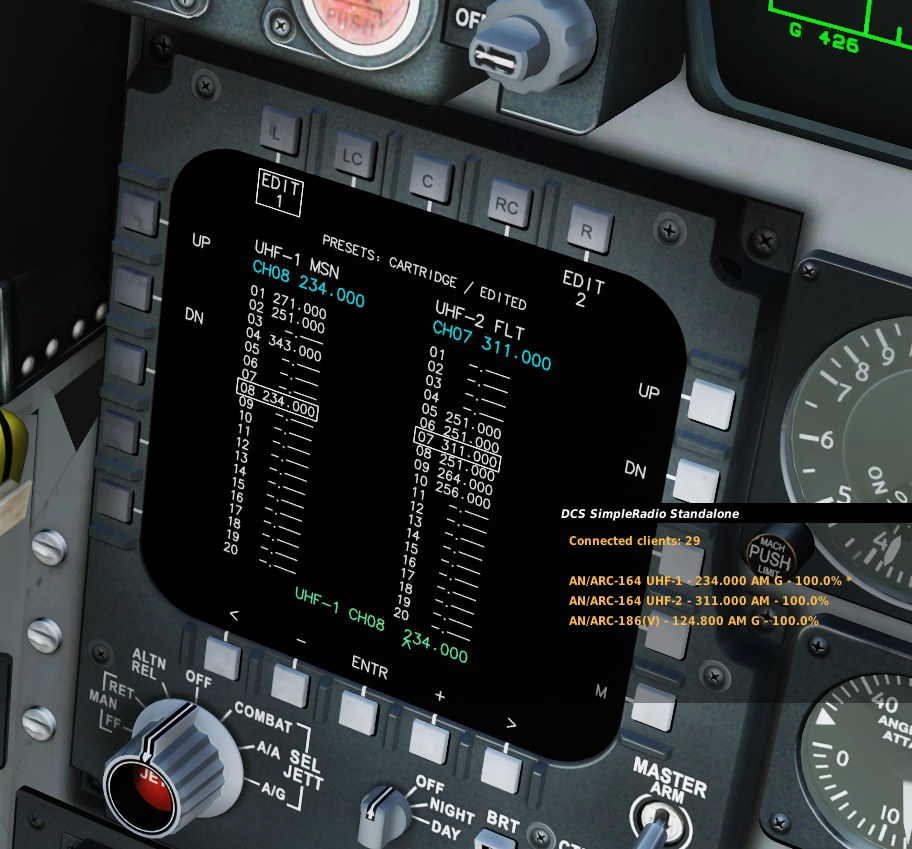
RADIO page: UHF-1 and UHF-2 with 20 presets each, the active channels boxed, and the SRS overlay showing the same frequencies
SL. 7RADIO page, with SRS following it

Radios through SRS

UHF-1 for mission comms and UHF-2 for your flight, 20 presets each, from the mission or your cartridge. Step through them on the page or with keybinds, and SRS tunes along. Any preset's frequency can be changed in the cockpit.

Works with SRS's UDP command port (9040 by default).

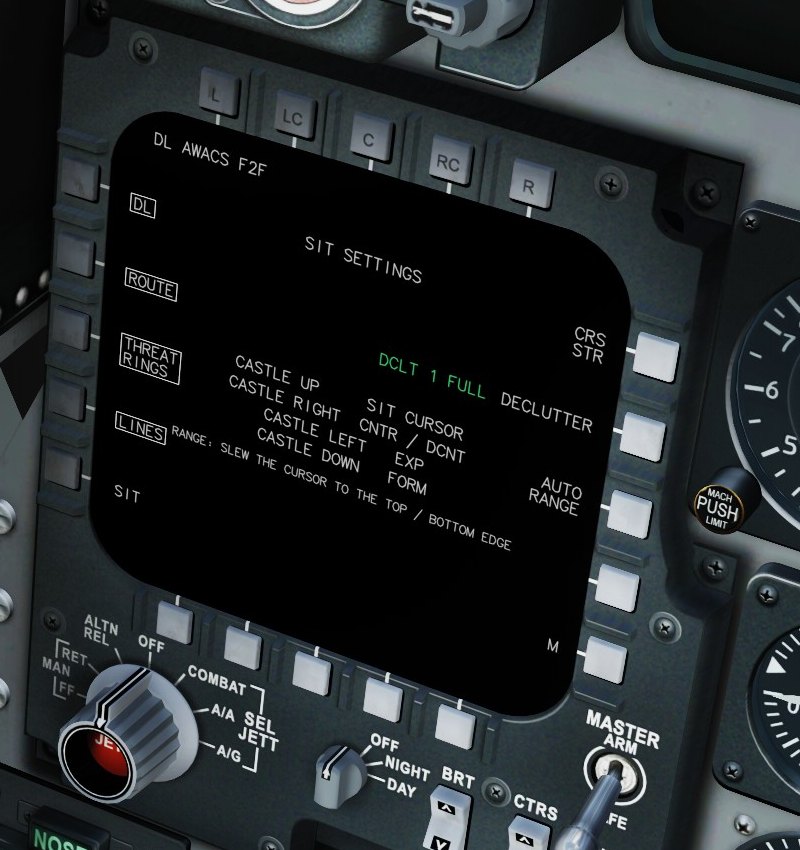
SIT SETTINGS page: datalink status, layer switches, course line, declutter and auto range
SL. 8SIT settings

SIT settings

Datalink status and what is drawn: DL, route, threat rings, lines, course line, declutter, auto range.

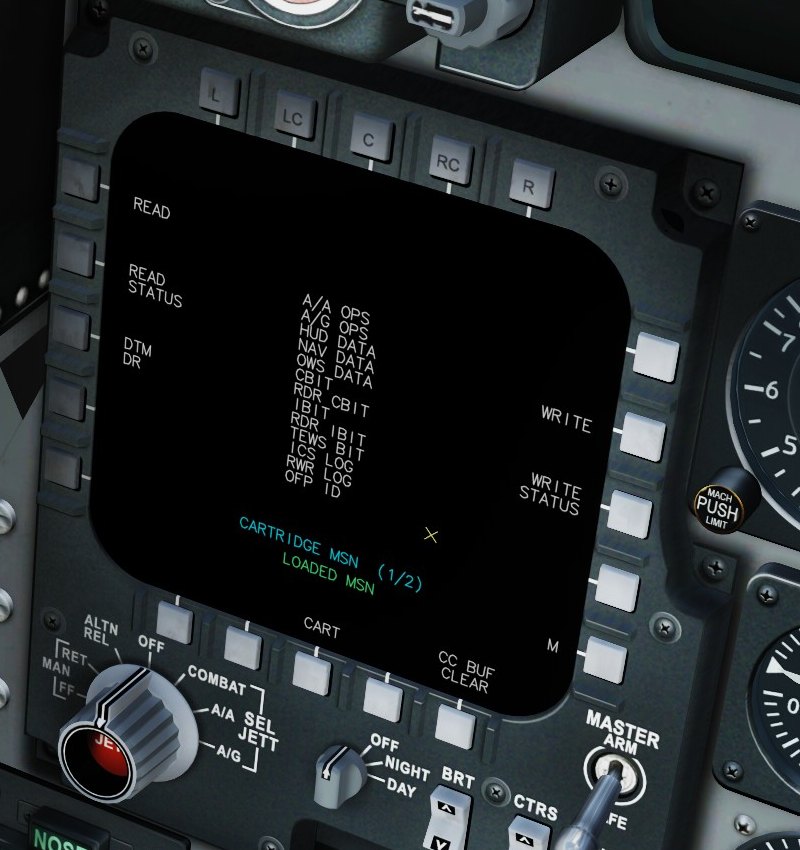
DTM page: cartridge MSN loaded, the list of data blocks
SL. 9DTM

Data cartridges

Pick a cartridge and READ: route, bullseye, drawings, radio presets, CMDS programs.

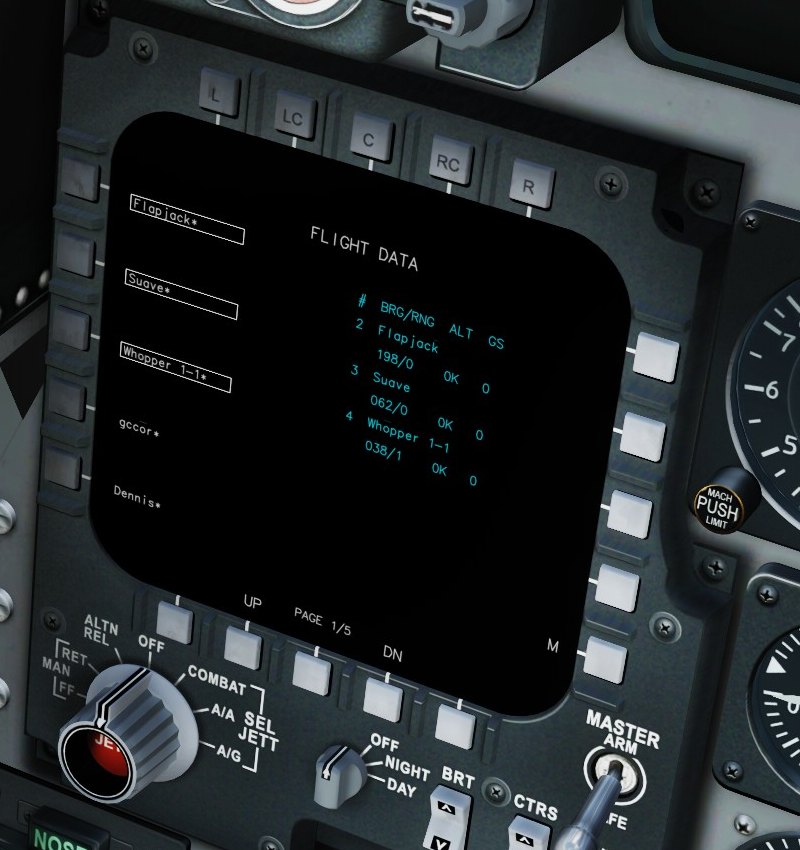
FLIGHT DATA page: friendly aircraft to pick as flight members and the members' bearing, range, altitude and speed
SL. 10Flight data

Your flight

Pick your flight members; they get numbers on the SIT page and their bearing, range, altitude and speed here.

Power-up

SL. 11
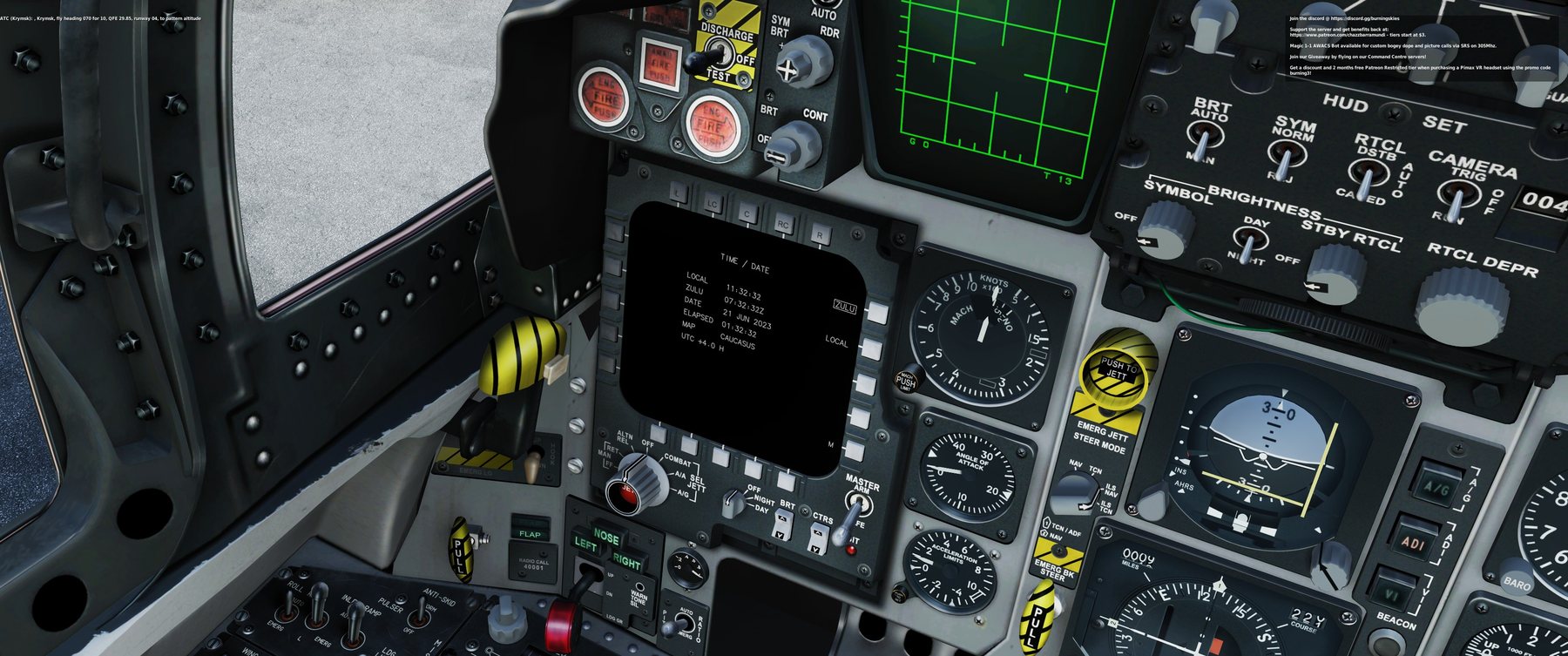
The F-15C's left instrument panel with the add-on's display on the lower-left MPCD showing the TIME / DATE page
SL. 11The MPCD in the F-15C's panel, TIME / DATE page

A display that needs power

On a cold start the MPCD stays dark until the jet has power: the electric power switch or an engine running. Then it runs a short self test and opens on the DTM page, ready for your cartridge. Hot and air starts come up on the SIT page.

  • The OFF / NIGHT / DAY knob below the display is clickable: OFF switches it off, NIGHT dims it.
  • The BRT rocker sets the brightness in ten steps.
  • All 20 bezel buttons are clickable and bindable.

DTM Planner

ONE HTML FILE · OFFLINE
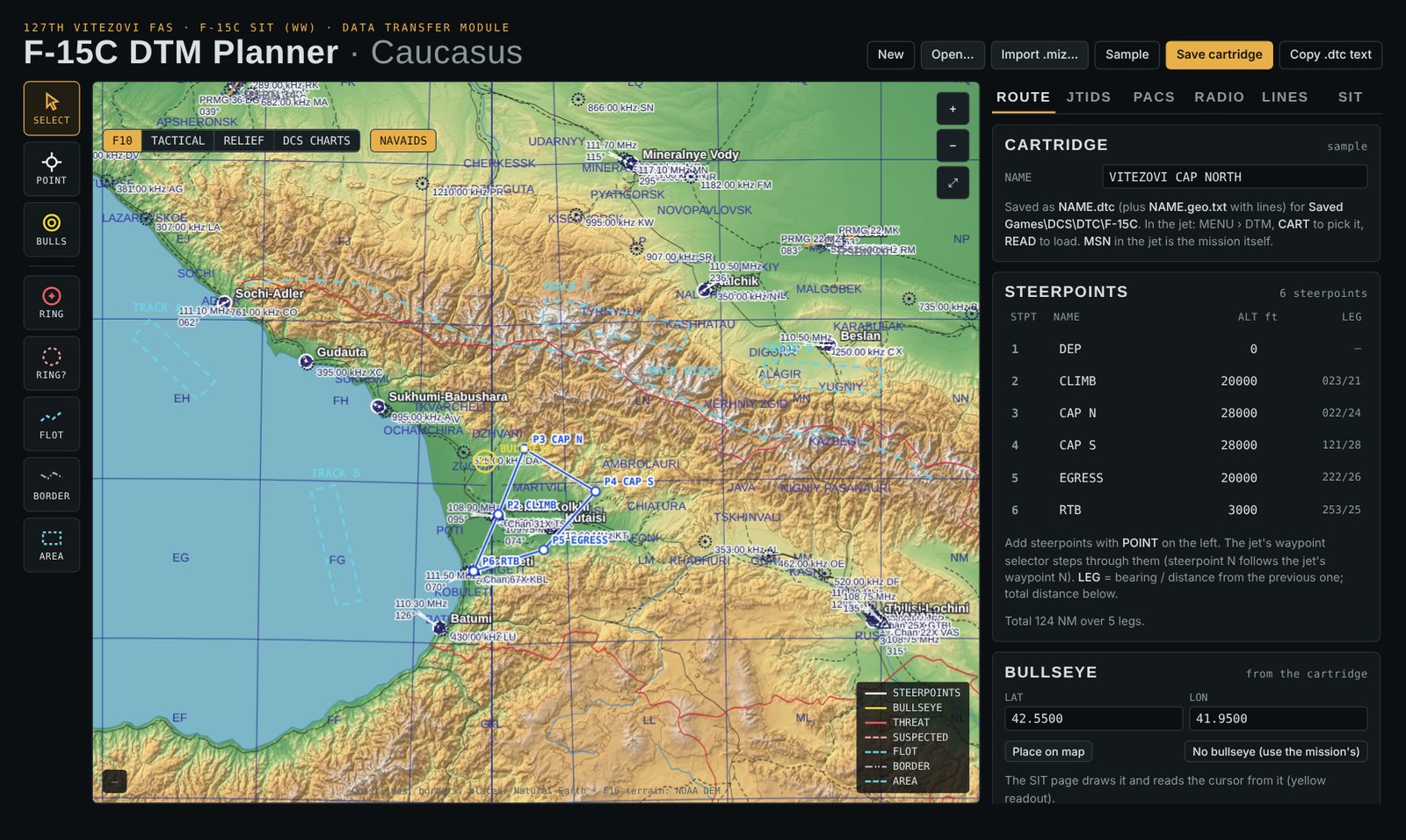
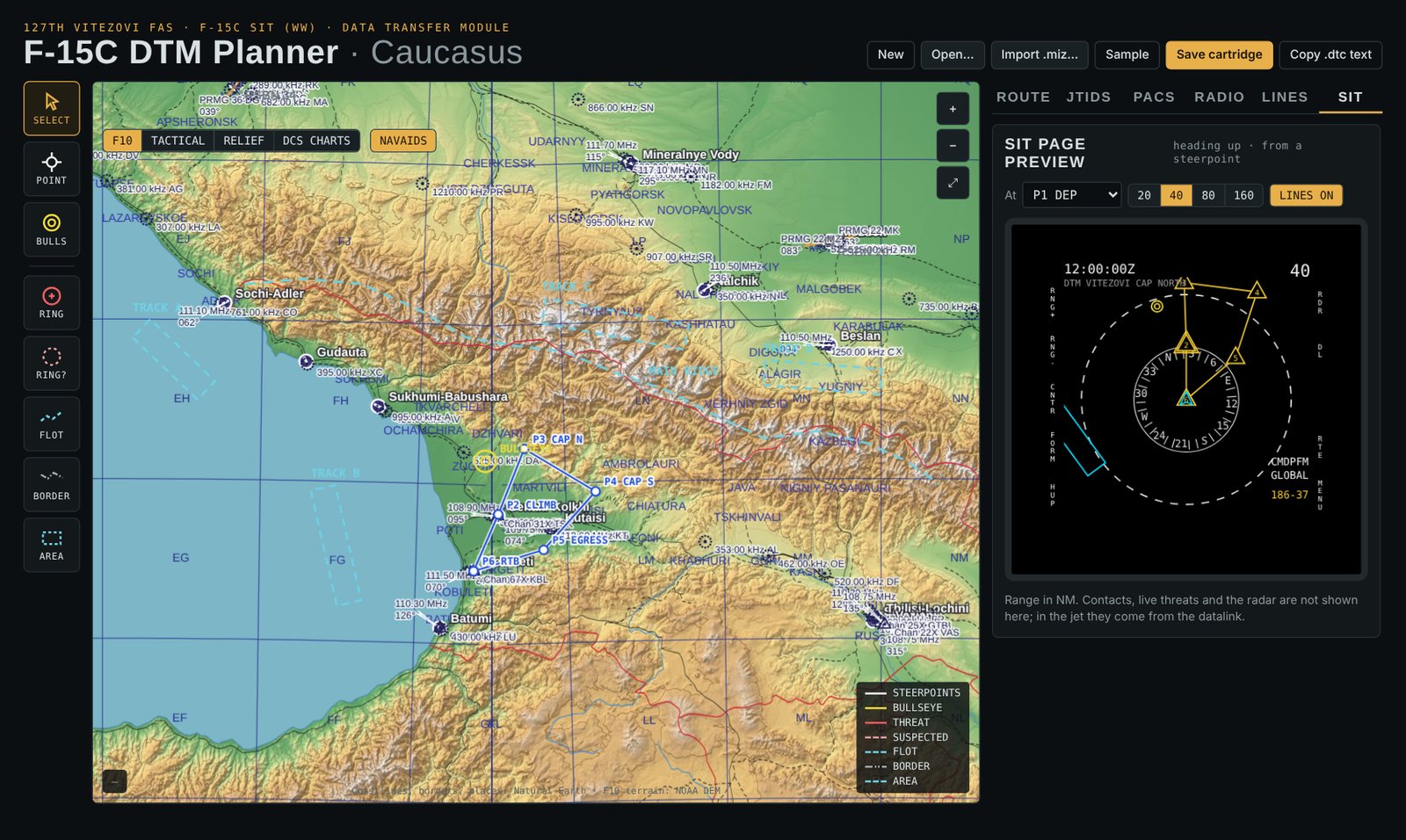
F-15C DTM Planner on the Caucasus: shaded relief map with a six-point route, bullseye, navaids and the steerpoint list
FIG. D1Route tab, Caucasus

Plan it, load it in the jet

The F-15C DTM Planner is a single HTML file that runs offline in any browser, with the DCS maps built in. Plan your flight, save the cartridge into Saved Games\DCS\DTC\F-15C, and in the jet go to DTM, pick it and press READ.

  • Route with altitudes, bearing and distance per leg, and the bullseye.
  • Threat rings, suspected threats, FLOT, borders and areas, drawn straight onto the map.
  • Radio presets for both UHF radios, CMDS programs, combat jettison groups.
  • Imports a mission file (.miz) to start from what the mission already has.
  • A SIT page preview shows the picture you will get in the cockpit.
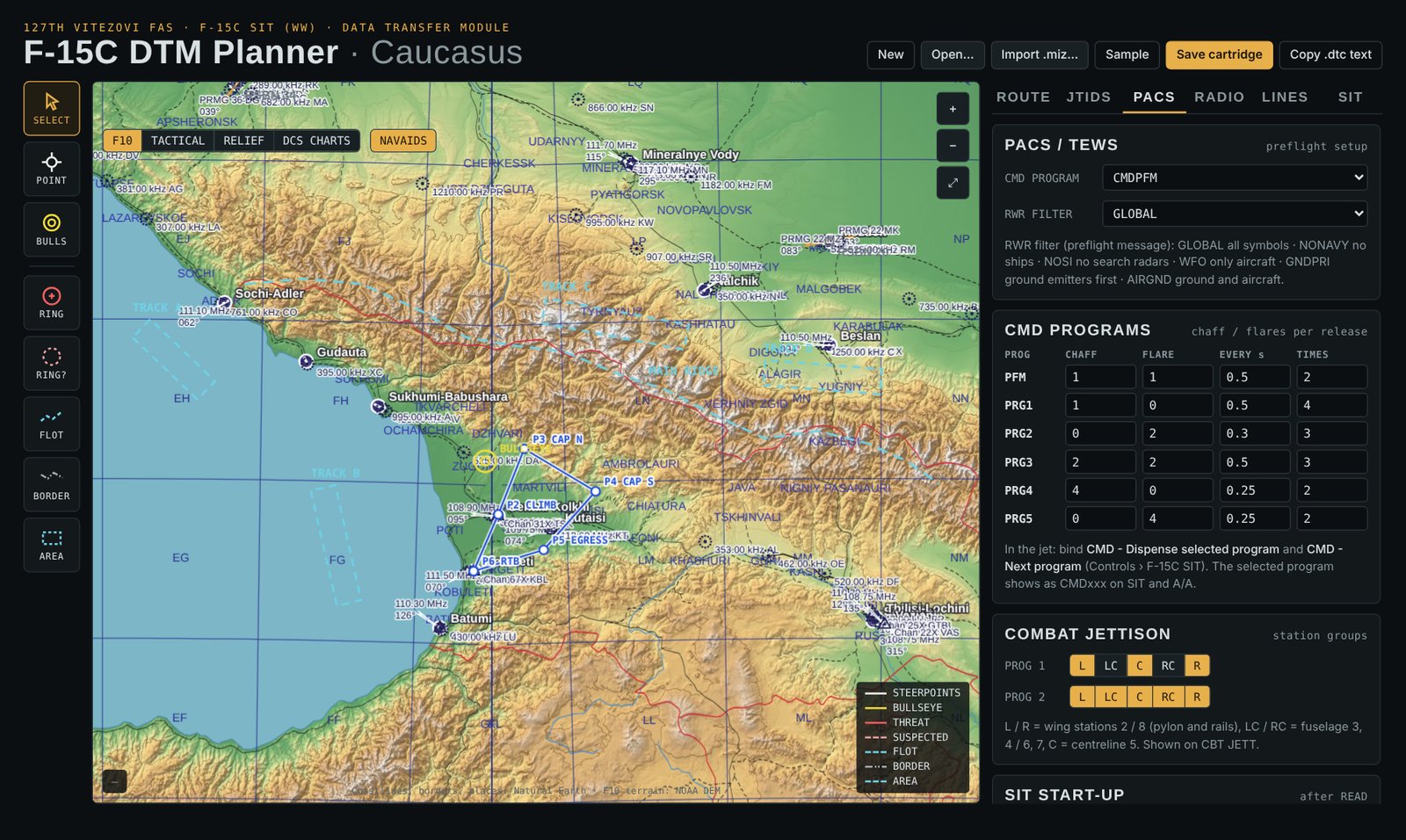
PACS tab: CMD program, RWR filter, six CMD programs and the two combat jettison programs
FIG. D2PACS

Stores and countermeasures

CMD programs, RWR filter and both combat jettison programs, ready when you READ the cartridge.

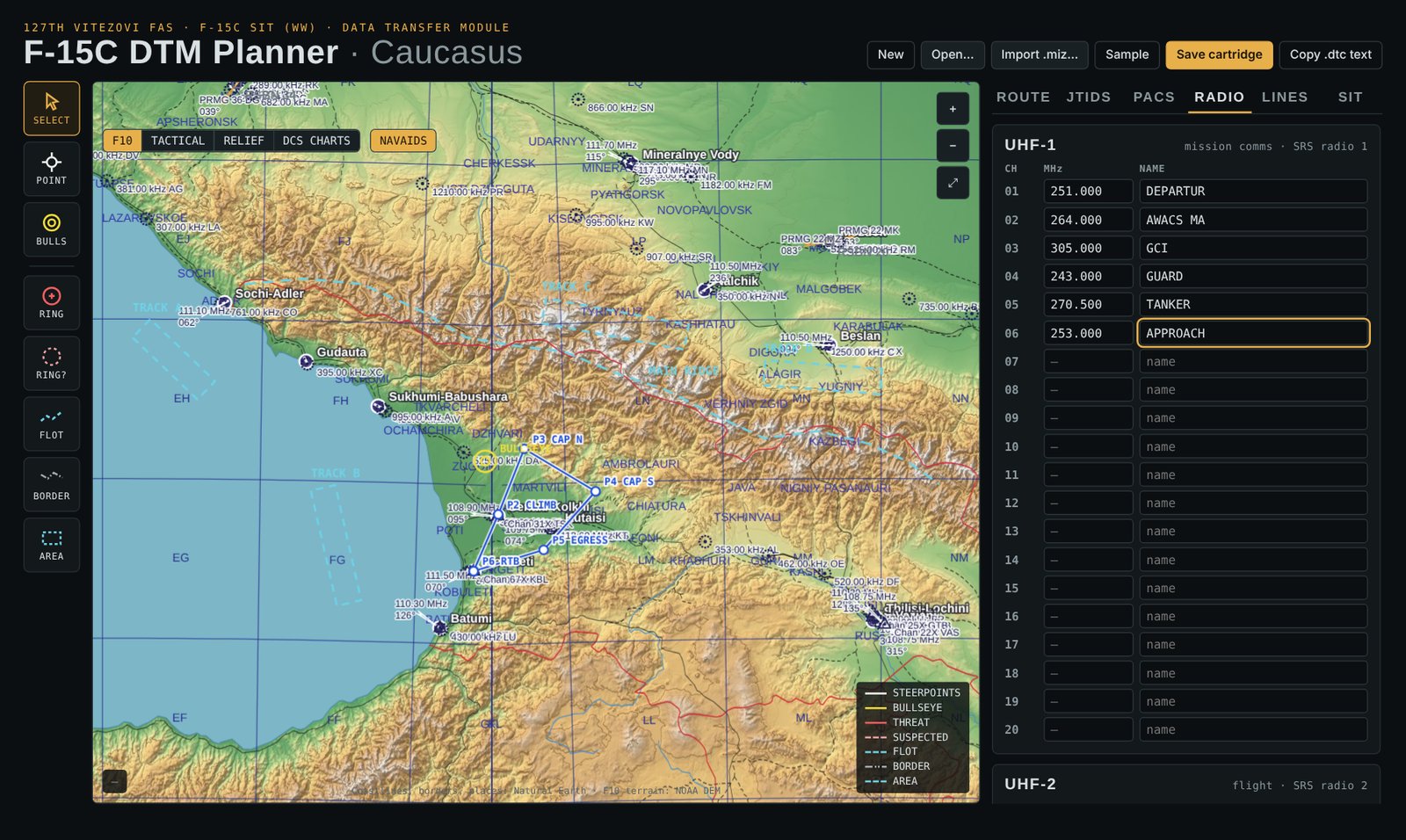
RADIO tab: UHF-1 presets with frequencies and names
FIG. D3Radio

Radio presets

20 channels per radio with a short name each, shown on the cockpit's RADIO page.

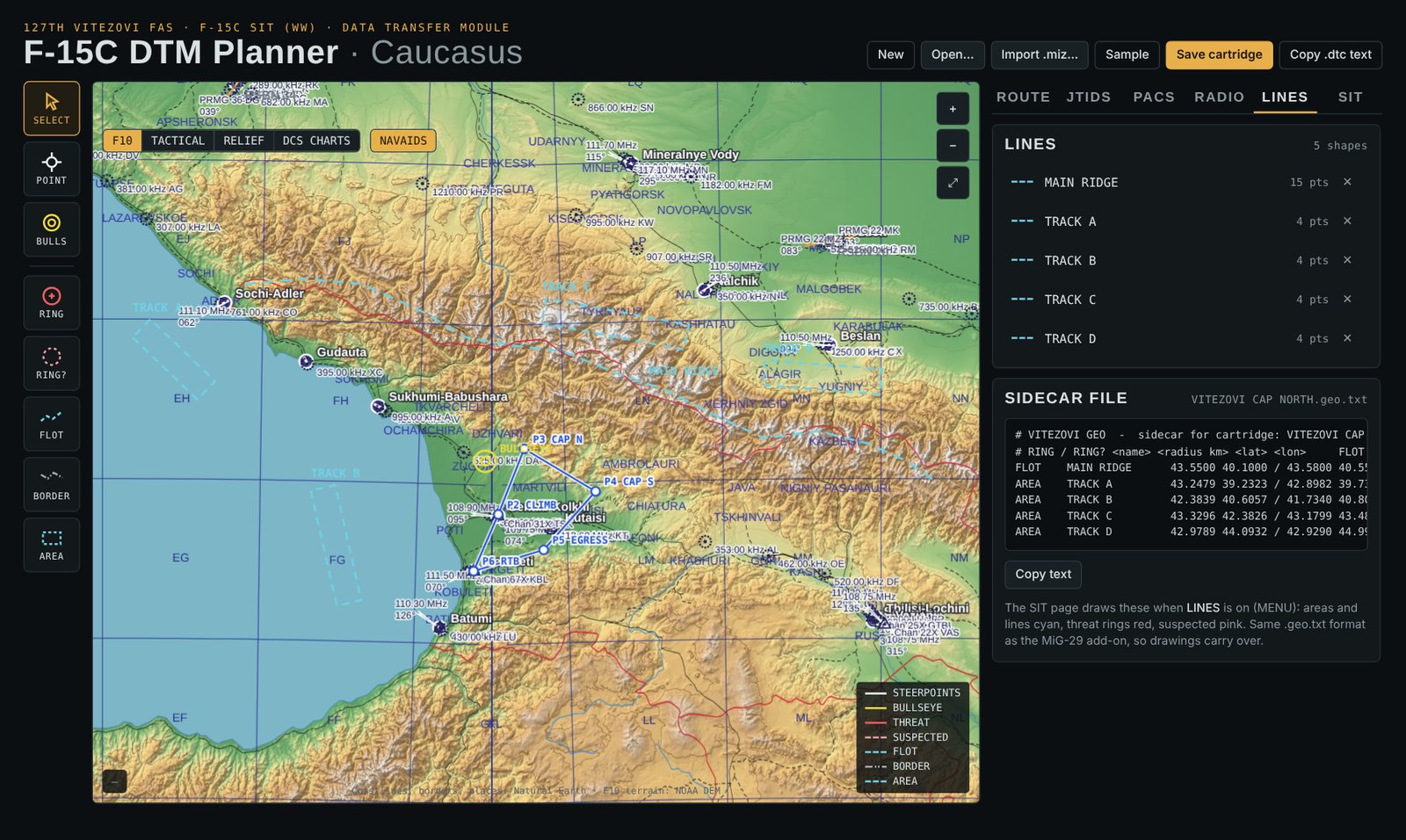
LINES tab: threat rings, FLOT, borders and areas drawn on the map
FIG. D4Lines

Drawings

Rings, lines and areas that appear on the SIT page in flight.

SIT tab: a preview of the SIT page from a chosen steerpoint at 40 NM
FIG. D5SIT preview

Preview

See the route and drawings as the SIT page will show them, from any steerpoint and range.

Install

Everything lives in your Saved Games folder. The installer copies the add-on's export script and hook, adds one line to Export.lua and puts the add-on's controls into the F-15C's controls file. UNINSTALL takes all of it out again.

  1. Unzip into Mods\techDownload v1.0 and unzip it so the folder sits at Saved Games\DCS\Mods\tech\F-15C SIT (WW).
  2. Run INSTALL.batClose DCS first. Run it again after every DCS update or repair: DCS puts its own controls file back, your key assignments come back with the add-on's block.
  3. Bind and flyOptions > Controls > F-15C, category F-15C SIT: castle switch, SIT cursor, range, declutter, marks, CMDS, radios. The pilot manual explains every page.

Revisions

RevAdded
1.0First release: SIT page with radar, datalink, EWR reports, threat rings, route, bullseye, drawings, missiles in flight and mark points; SIT settings and declutter; A/A, combat jettison, weapon load, CMD programs, RADIO (SRS), DTM, time / date, own data, flight data and BIT pages; power-up with self test, OFF / NIGHT / DAY knob and brightness; DTM Planner; installer with keybinds.

DCS World and the F-15C: Eagle Dynamics. Planner maps: Natural Earth, NOAA DEM. A fan-made add-on, not affiliated with Eagle Dynamics.