BULLETIN WW / SU-1 REV 1.2 AIRCRAFT SU-27 / J-11A (FLAMING CLIFFS) RADIOS R-800 УКВ · R-864 КВ
DCS World · Flaming Cliffs Su-27 / J-11A

Su-27 Radio

The Flanker's radios, worked from the cockpit the 80s Soviet way: load a cartridge on the ВВОД ДАННЫХ plate, turn the КАНАЛ knobs on the УКВ / КВ panel and SRS tunes along, set each radio's volume with its ГРОМК knob, and read your channels off the handwritten card on the canopy rail. New in 1.2: a retrofit colour MFD with SA, NAV, COM, STORES and RWR pages.

A tech mod for the stock Su-27 and J-11A. Needs DCS World with the Su-27 or J-11A from Flaming Cliffs, and SRS for the radios. It sits in Saved Games and changes nothing in the DCS install, so DCS updates leave it alone.

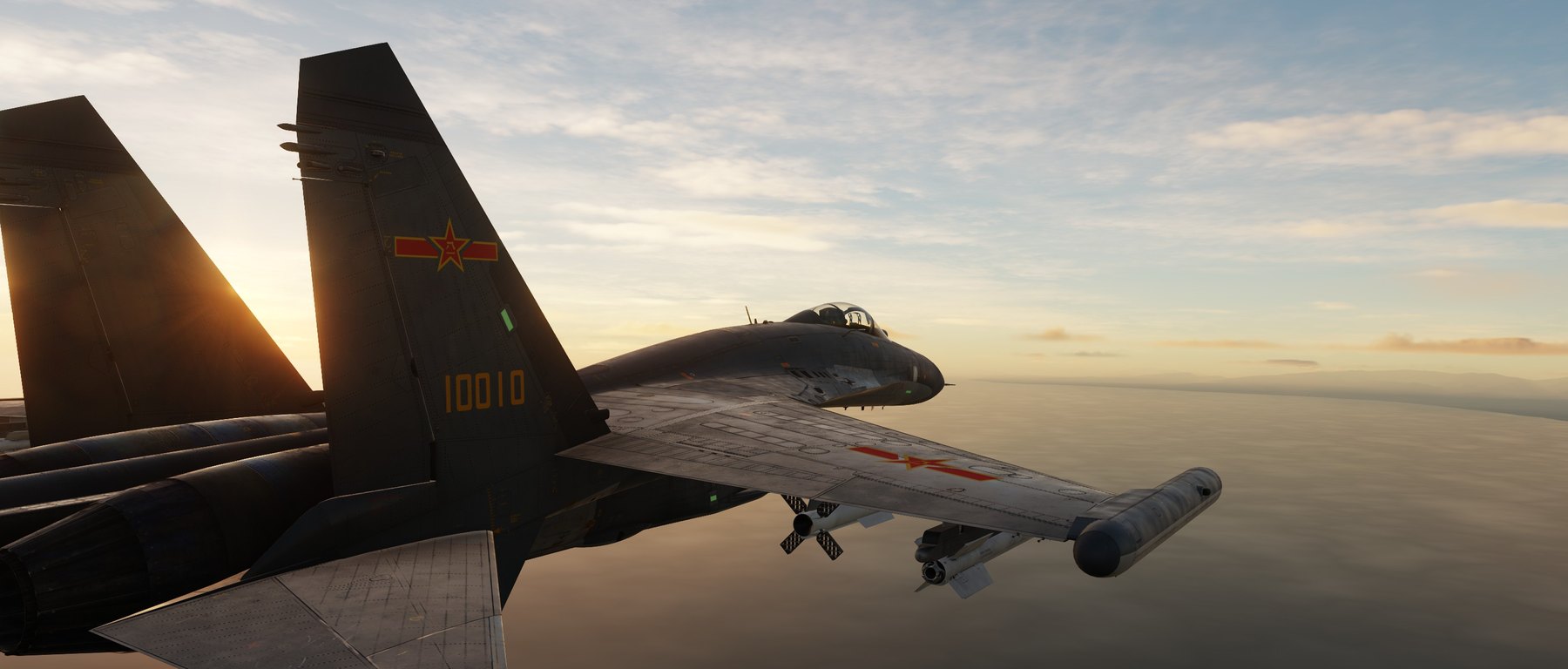
A J-11A in flight at sunset over the sea
SL. 0Su-27 / J-11A
6
cartridges on the КАССЕТА knob, plus the mission's presets
2×20
channels: R-800 УКВ and R-864 КВ, tuned in SRS
2
ГРОМК volume knobs, one per radio
20
rows on the handwritten channel card
3
jets in one DTC Planner: MiG-29A, F-15C, Su-27
0
files changed in the DCS install

In the cockpit

SL. 1 – SL. 4
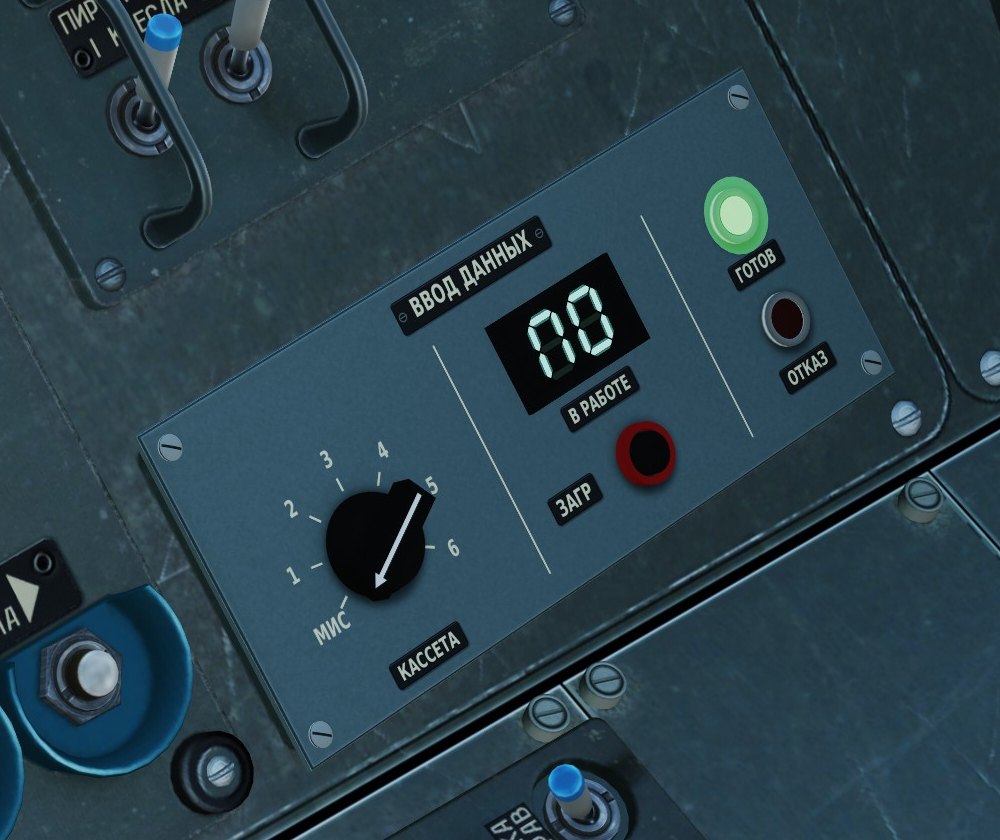
The ВВОД ДАННЫХ plate on the right console wall: КАССЕТА knob on МИС, the В РАБОТЕ window showing П0 and the green ГОТОВ lamp lit
SL. 1The plate: the mission's presets loaded (П0, ГОТОВ)

ВВОД ДАННЫХ: loading a cartridge

A data input plate on the blank cover beside your right hip. Turn the КАССЕТА knob to МИС for the mission's own presets or to one of six cartridges, press ЗАГР, and the plate reads it.

  • The В РАБОТЕ window flashes while it reads, then shows what is in: П0 for the mission, П1 to П6 for a cartridge.
  • ГОТОВ (green) when it worked, ОТКАЗ (red) when there is no cartridge for that number; the one loaded before stays in.
  • Dark without electric power; a short lamp test when power comes on.
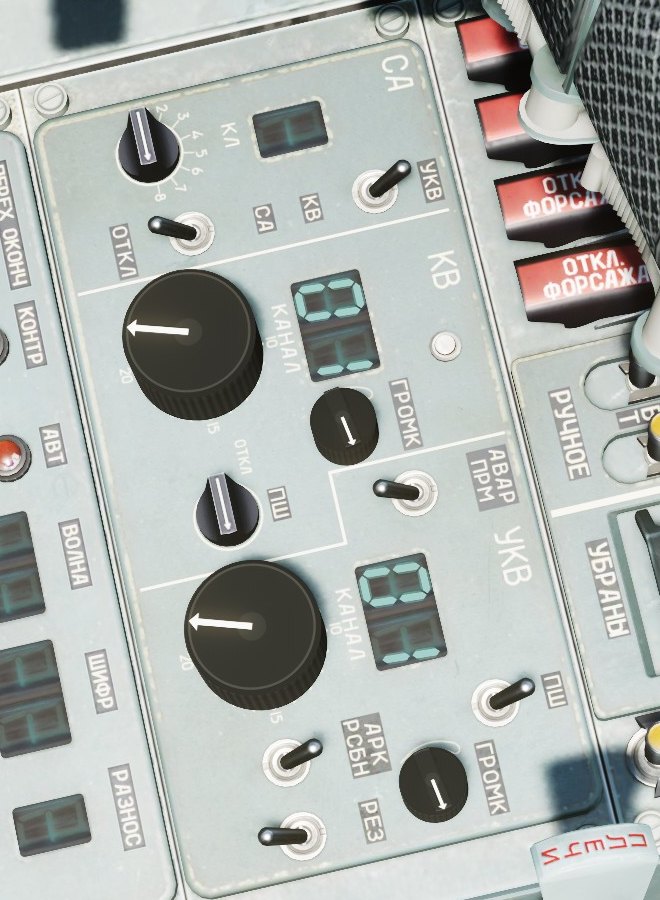
The УКВ / КВ radio panel on the left console: both КАНАЛ windows showing channel 01, the КАНАЛ knobs and the small ГРОМК knobs
SL. 2The УКВ / КВ radio panel

КАНАЛ and ГРОМК

The radio panel on the left console works. The big КАНАЛ knobs pick the channel, 1 to 20, and the window above each one shows it. Every step tunes SRS: УКВ is the R-800 (radio 1), КВ the R-864 (radio 2).

  • The knobs go round and round: past 20 comes 1 again.
  • After a load both radios go straight to the channels the knobs are on.
  • The small ГРОМК knobs set each radio's volume in SRS, from silent at 7:30 to full at 4:30. They start at 80 %.
  • New in 1.1: channel up / down and volume up / down for both radios can be bound in Options › Controls, category "Su-27 Radio (WW)". The knob turns with the key.
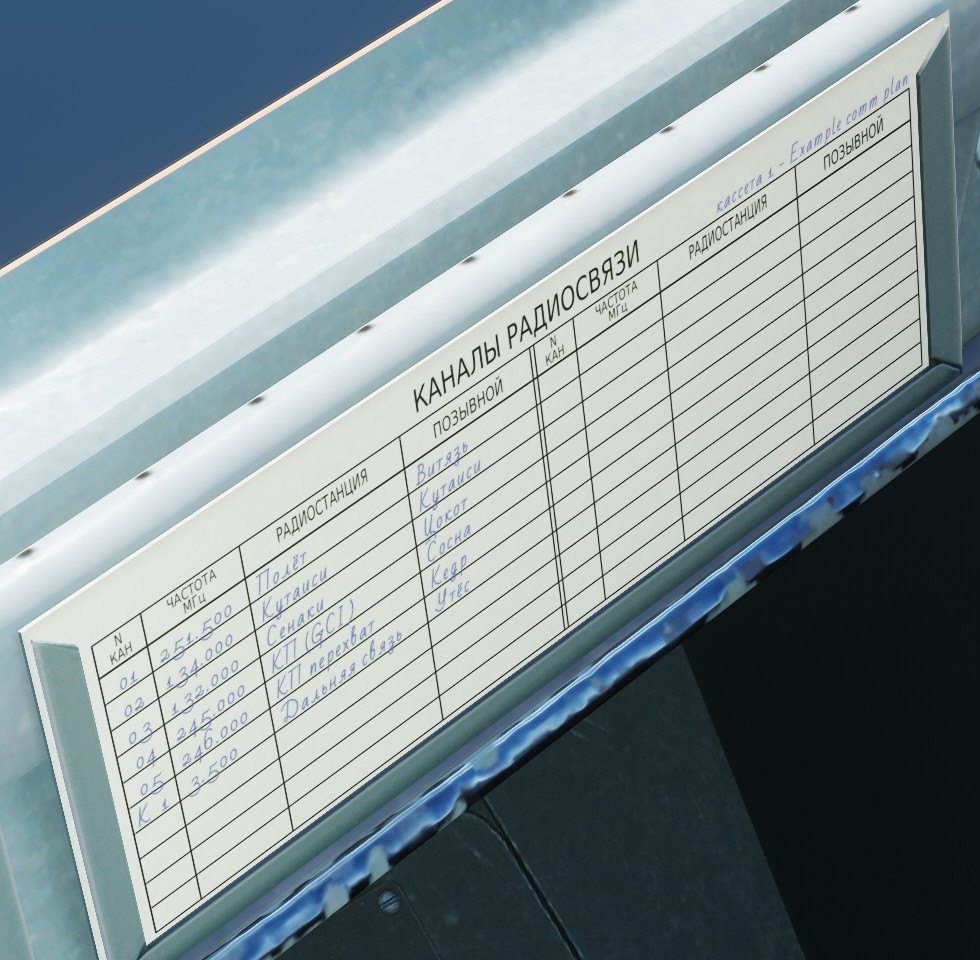
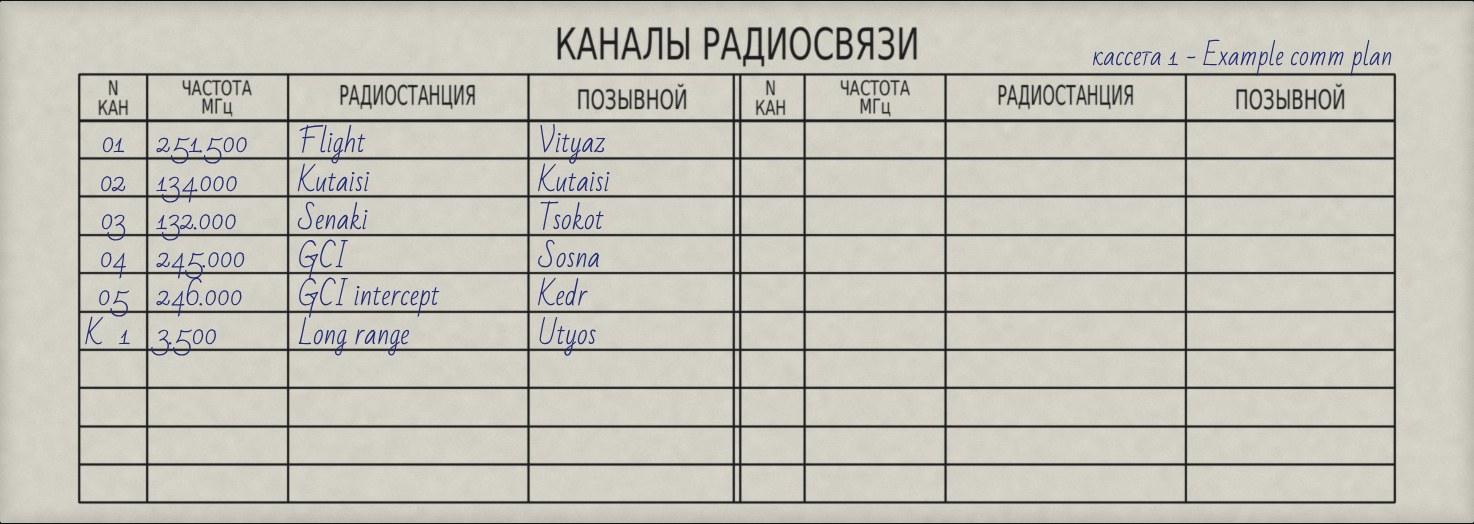
The КАНАЛЫ РАДИОСВЯЗИ card on the right canopy rail, filled in by hand in blue ink: channel, frequency, station and callsign
SL. 3КАНАЛЫ РАДИОСВЯЗИ on the canopy rail

The channel card

ED's channel card on the right canopy rail gets written on, in blue ballpoint: every channel of the loaded cartridge with its frequency, station and callsign. It is rewritten whenever you load, so a glance tells you where the tower is.

  • УКВ channels first, then КВ, marked К 1, К 2 …: 20 rows, like a real card.
  • Top right: which cartridge is in, or the mission's presets.
  • With МИС the stations come from the mission; your group's own frequency is "своя группа".
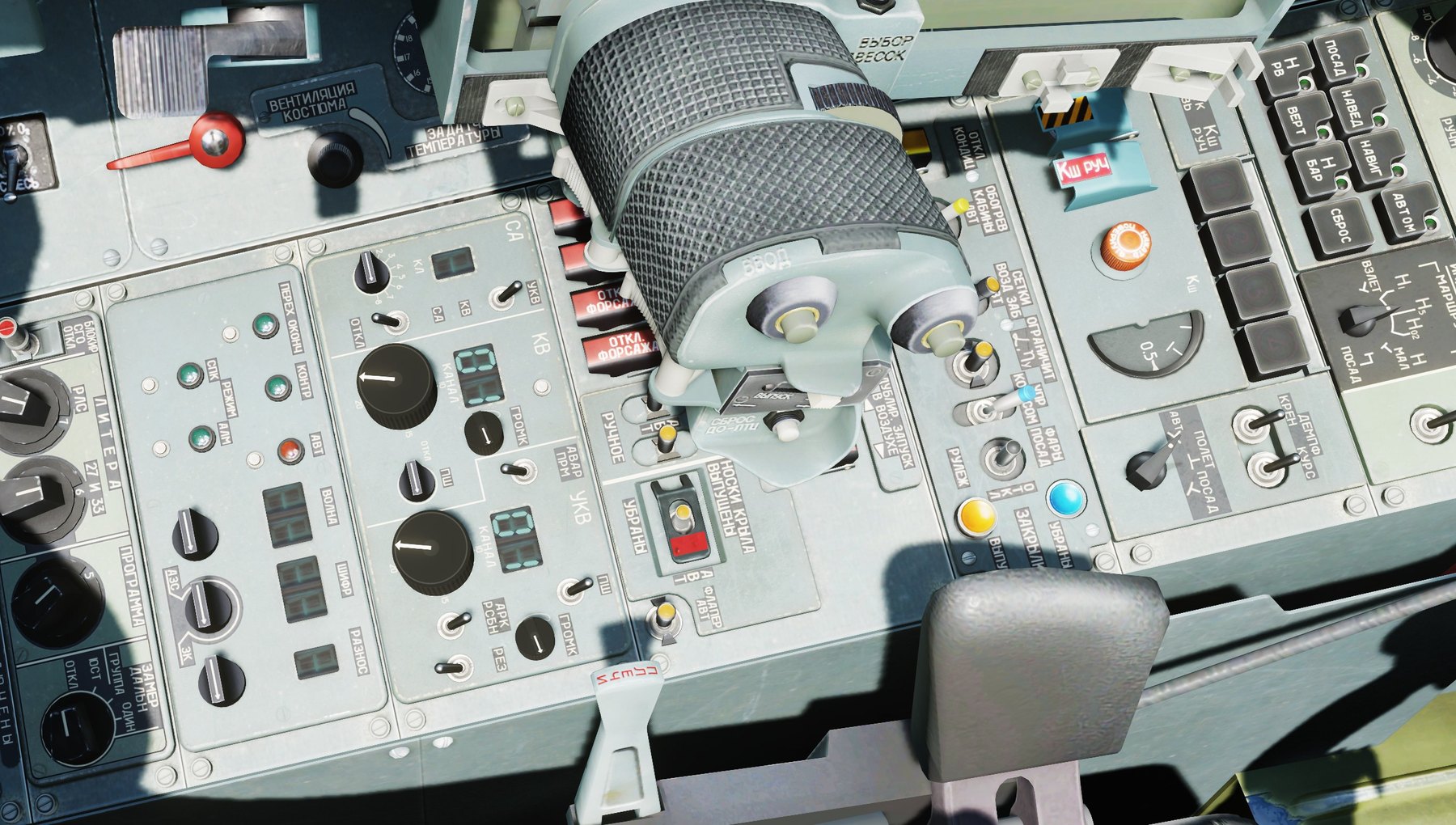
The Su-27's left console with the УКВ / КВ radio panel beside the throttles
SL. 4The left console

Made to fit in

The plate, the knobs and the card are placed on ED's own cockpit, measured from its model: they sit on the panels as if they had always been there, in the Su-27 and in the J-11A.

  • Everything is clickable with the mouse, left click and right click.
  • No keybinds to set up, no files in the DCS install to patch.
  • Options > Special > Su-27 Radio switches it on and off.
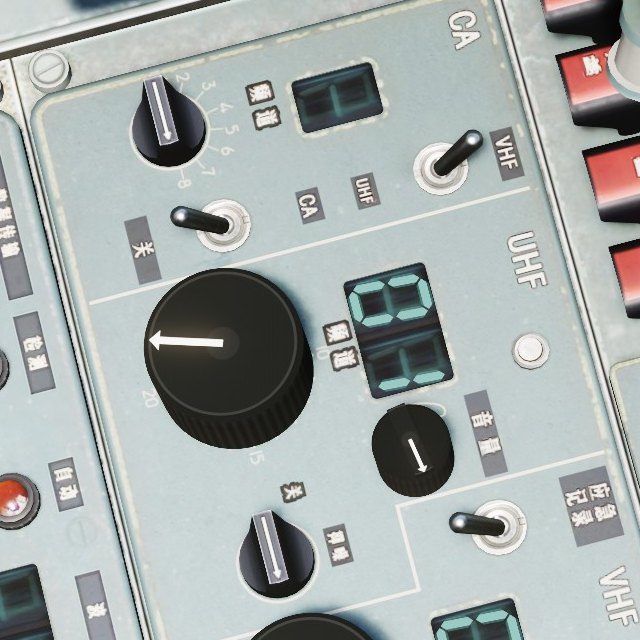
The J-11A's radio panel, with Chinese labels, and the add-on's КАНАЛ and ГРОМК knobs
SL. 5J-11A radio panel

J-11A too

The J-11A shares the cockpit: same plate, same knobs, same card, with its own labels.

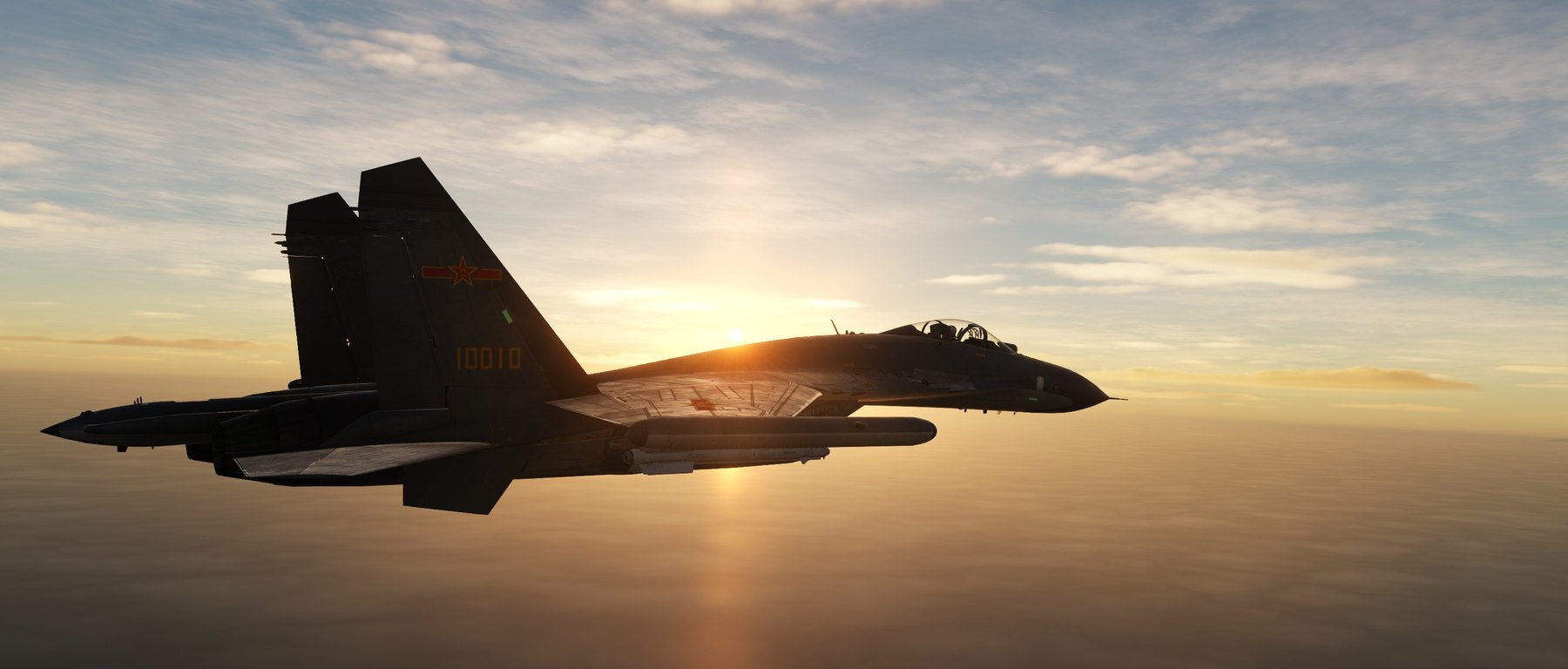
A J-11A from behind, flying into the sunset
SL. 6Into the sunset

Multiplayer ready

Mission presets come from your own slot, also on servers with dynamic slots.

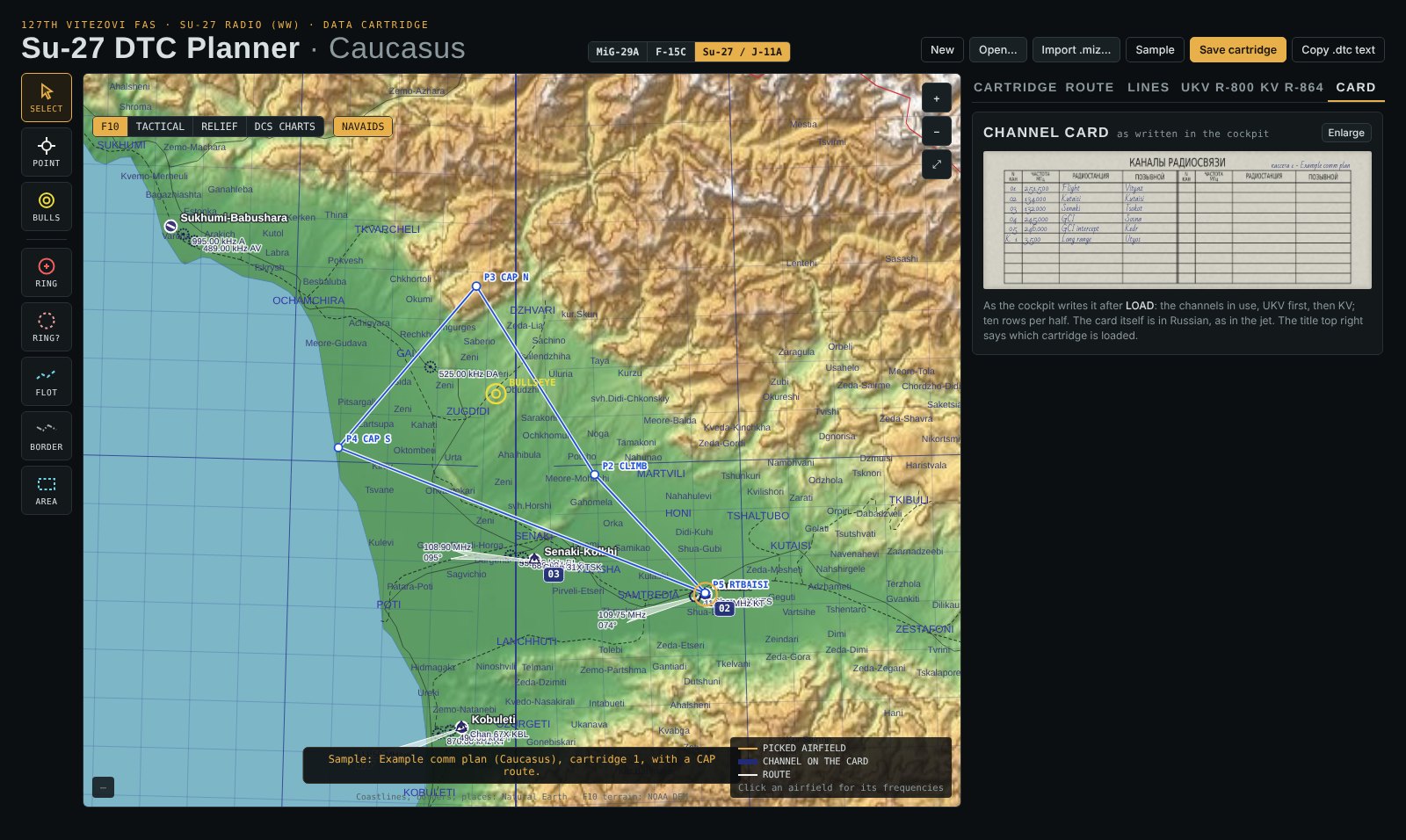
The DTC Planner's CARD tab showing the card for a cartridge
SL. 7Planned card

Plan it first

The planner shows the card before you fly, exactly as the cockpit will write it.

The MFD

NEW IN 1.2
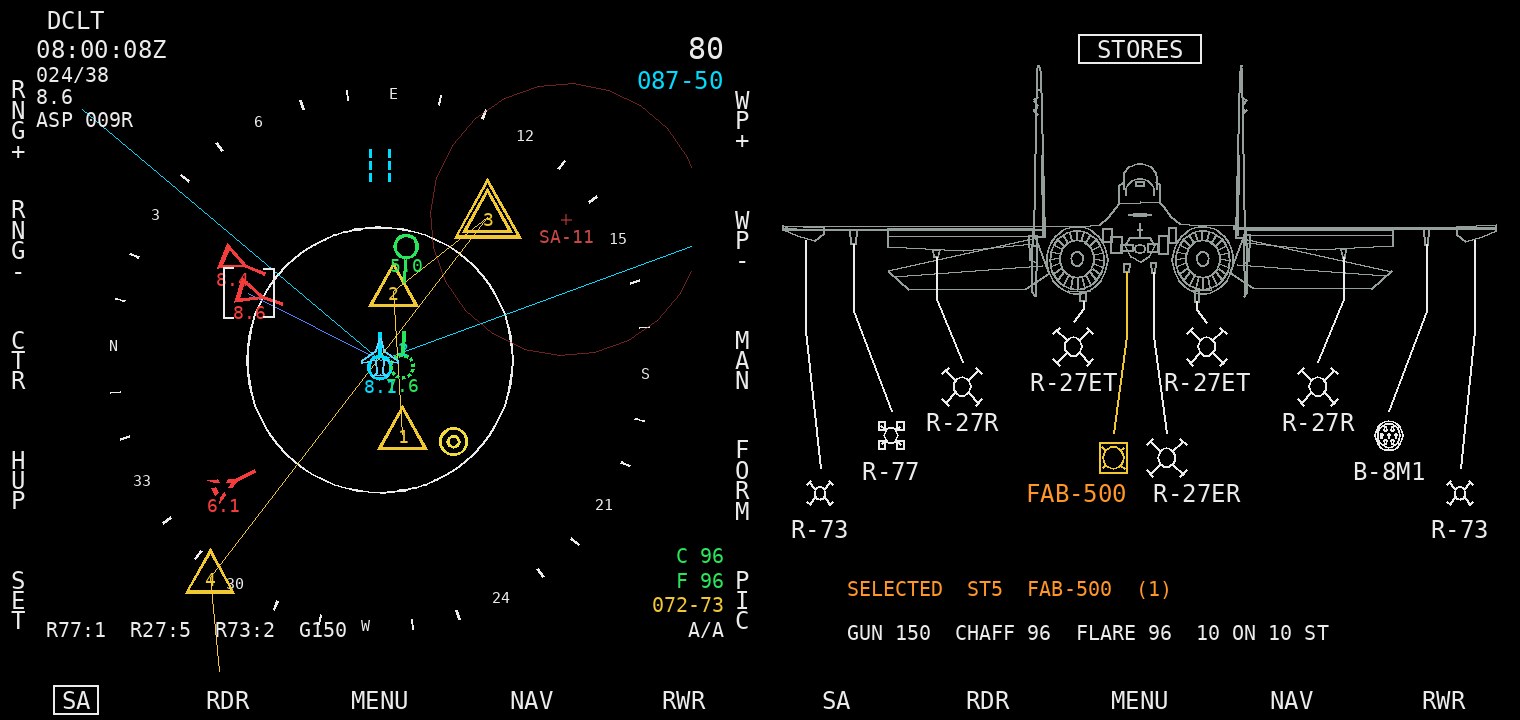
The MFD's SA page with contacts, route and threat rings, and the STORES page with the Su-27 from behind and the missiles on its ten stations
SL. 5The MFD: SA and STORES

New in 1.2: the MFD

A colour MFD retrofitted over the HDD, modern against the worn 80s panel, with 20 soft keys and ED's ЦЕЛИ keypad for typing.

  • SA: radar and datalink contacts, your flight, threat rings, route and bullseye.
  • PICTURE, NAV with your own waypoints, HSI, FUEL with bingo, RWR.
  • COM: both radios from the MFD, and a typed frequency stays on its channel.
  • STORES: the jet from behind with what is on each of the ten stations.
  • DTC: route, bullseye, bingo and lines from the same cartridges as the radios.

WW DTC Planner

MIG-29A · F-15C · SU-27 · ONE HTML FILE
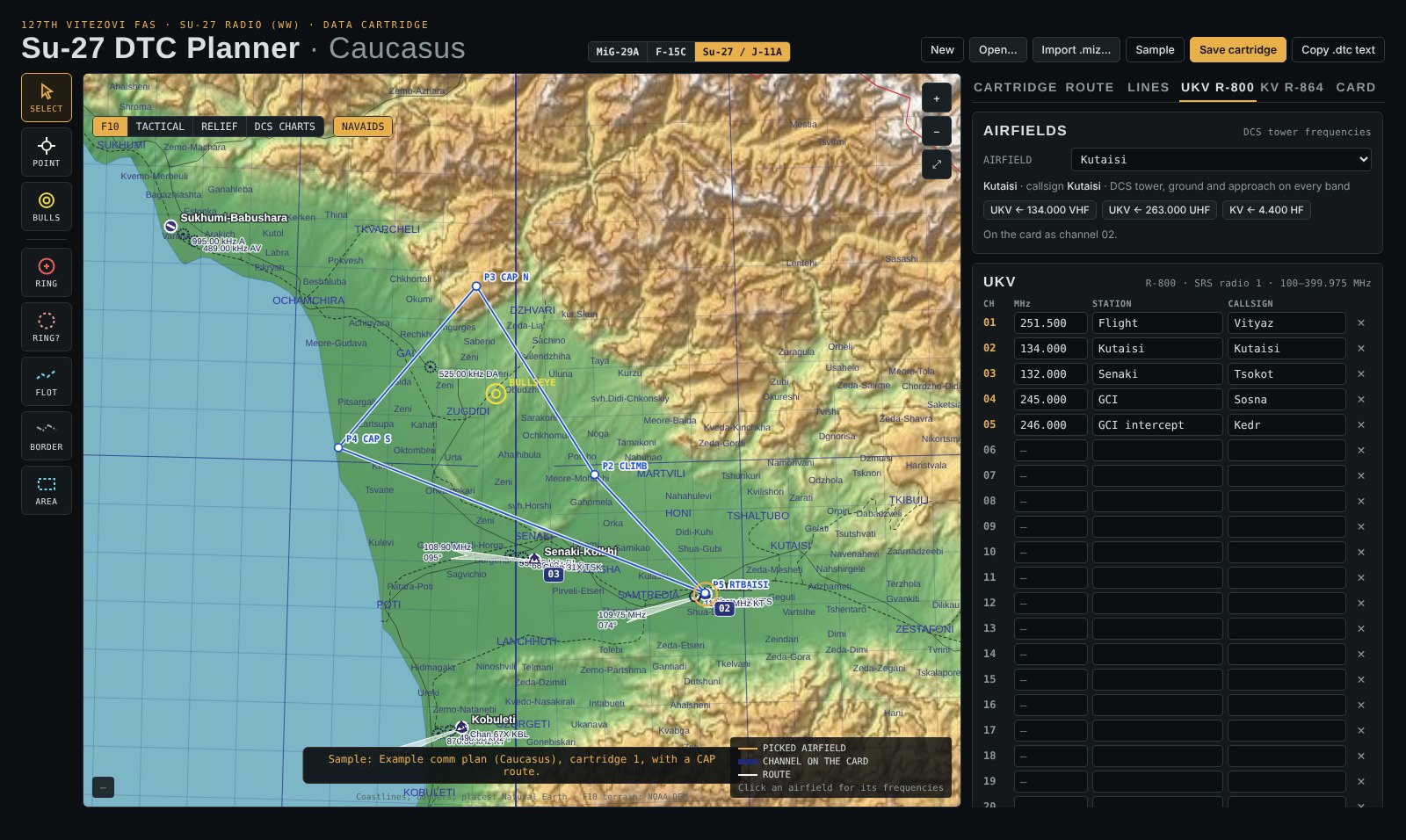
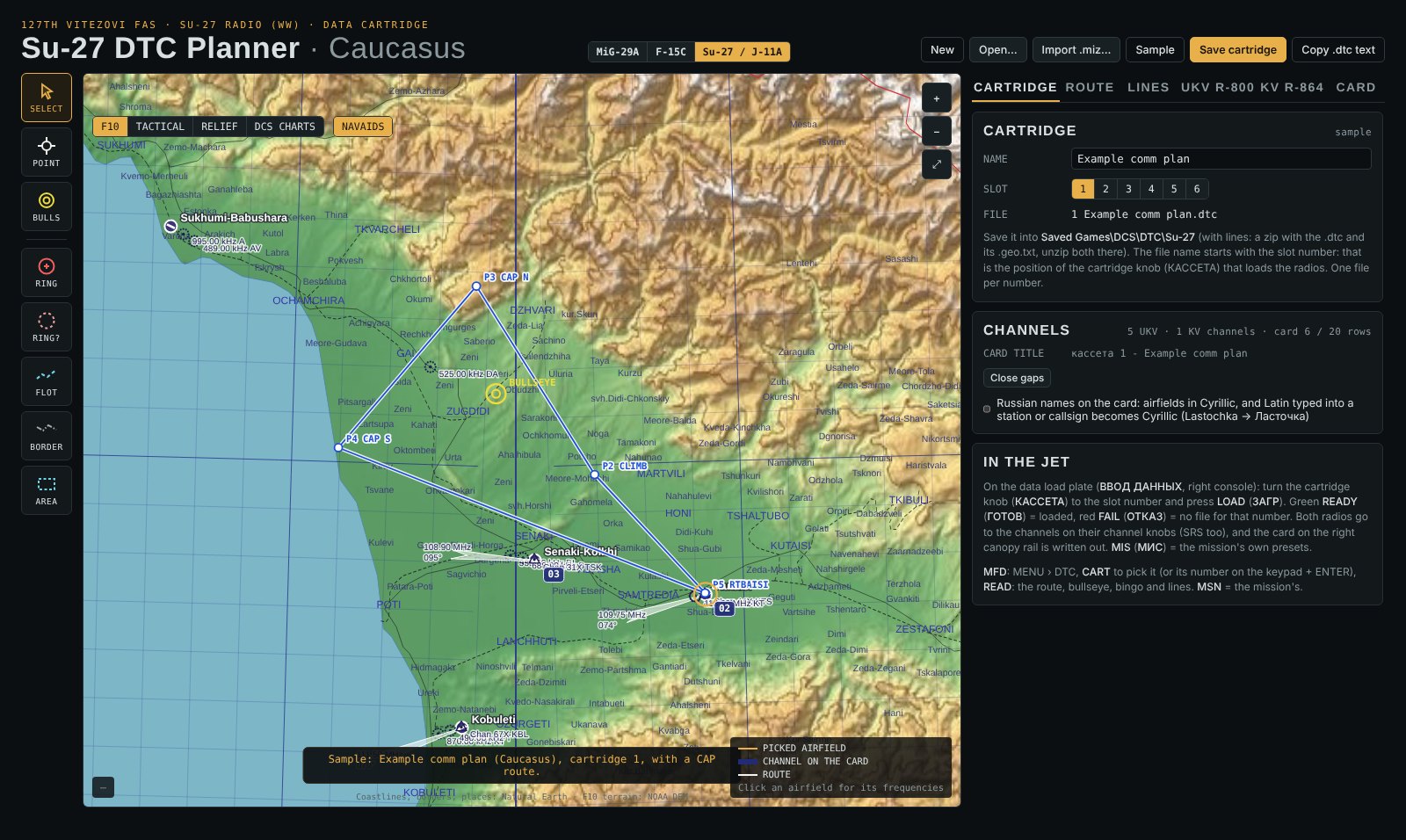
WW DTC Planner with Su-27 picked: Caucasus map with the airfields on the card tagged by channel, Kutaisi picked, and the UKV channel list
FIG. D1UKV channels, Caucasus

Write the comm plan, load it in the jet

The WW DTC Planner makes the cartridges for all three Wild Wolves mods: pick MiG-29A, F-15C or Su-27 / J-11A at the top. It runs in any browser, online or as one offline file in the download, with the DCS maps built in.

  • 20 UKV and 20 KV channels with station and callsign for the card.
  • Click an airfield for its DCS tower frequencies: VHF or UHF to UKV, HF to KV, with the airfield's name and callsign (in Russian if you like).
  • Steerpoints with altitude and time on target, bullseye, bingo and lines (ROUTE and LINES tabs), for the MFD.
  • Import a Su-27 flight's presets, route and drawings from a mission file (.miz).
  • Save it as 2 Vitezovi CAP West.dtc into Saved Games\DCS\DTC\Su-27: the first digit is the position of the cartridge knob (КАССЕТА).
The CARD preview: the channel card written out as it will be in the cockpit
FIG. D2CARD

The card, before you fly

See the card exactly as the cockpit will write it.

CARTRIDGE tab: cartridge name, slot number and the file name
FIG. D3CARTRIDGE

Cartridge and number

Name, slot (the КАССЕТА knob position) and the file name the jet looks for.

Install

The add-on lives in your Saved Games folder. The installer copies the hooks (the mission's radio presets, the MFD's map data) and an example cartridge, adds the MFD's export to Saved Games\DCS\Scripts\Export.lua, and adds the radio and MFD controls to the Su-27's controls files. UNINSTALL takes it all out again.

  1. Unzip into Mods\techDownload v1.2 and unzip it so the folder sits at Saved Games\DCS\Mods\tech\Su-27 Radio (WW).
  2. Run INSTALL.batIn that folder. After a DCS update or repair the radio controls disappear from Options › Controls: run it again (your key assignments are kept).
  3. FlyHave SRS running. Load a cartridge on the plate, or fly on the mission's presets. The pilot manual explains every knob.

Revisions

RevAdded
1.2The MFD: a retrofit colour MFD over the HDD with SA, PICTURE, NAV (own waypoints), HSI, COM (radios, typed frequency per channel), FUEL, STORES, RWR, FLIGHT, DTC, BIT, TIME and OWN pages; 20 soft keys and the ЦЕЛИ keypad; 4477th TAES badge; its own controls and options; the installer adds the MFD export. DTC Planner: ROUTE and LINES tabs, English interface. A cartridge with only a route loads on the plate. Updated zip (16 Nov): fixes a crash to desktop when locking a target with the SA page up.
1.1Bindable controls (Options › Controls › Su-27 / J-11A, category "Su-27 Radio (WW)"): УКВ and КВ channel up / down and volume up / down; the knobs turn with the keys. The installer adds them to the jet's controls files. ГРОМК knobs: start position is now checked properly.
1.0First release: ВВОД ДАННЫХ cartridge plate (МИС and six cartridges, ГОТОВ / ОТКАЗ, power and lamp test); УКВ / КВ radio panel with КАНАЛ channel knobs and windows and ГРОМК volume knobs, tuned in SRS; handwritten КАНАЛЫ РАДИОСВЯЗИ card; mission presets through a hook; WW DTC Planner for MiG-29A, F-15C and Su-27; installer. Su-27 and J-11A.

DCS World and the Su-27 / J-11A: Eagle Dynamics. Planner maps: Natural Earth, NOAA DEM. Handwriting: Bad Script font, SIL Open Font License. A fan-made add-on, not affiliated with Eagle Dynamics.