BULLETIN 127 FAS / MFD-1 REV 1.8.5 AIRCRAFT MiG-29A FULCRUM BASE KRN MODS COCKPIT MODERNIZATION V1.0.3
127th Vitezovi FAS · Wild Wolves

MiG-29 WW MFD

A modern multifunction display for the MiG-29A in DCS: a datalink situation page, intercept steering, route navigation with time on target, fuel planning, stores, RWR, loft attack cues and a full power-up sequence. All of it runs on the retrofit MFD of KRN MODS' modernized cockpit, in metric or imperial units as the jet itself is set.

Add-on, not a replacement. Needs the DCS MiG-29A Fulcrum module and KRN MODS' "MiG-29A(M) Cockpit Modernization" V1.0.3, which you download from KRN on the DCS User Files. The physical MFD, buttons and UFCP are KRN's work; this add-on brings the pages and is shared with KRN's agreement.

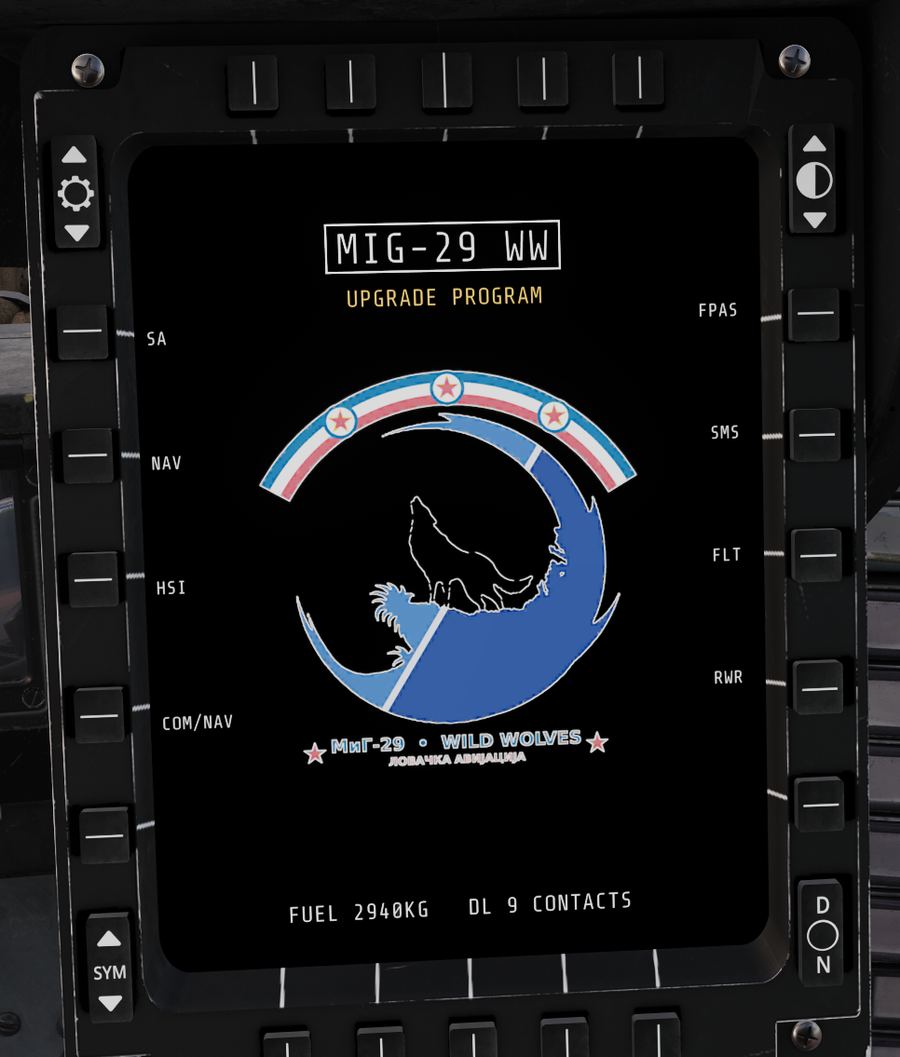
The MFD's MENU page in the cockpit: MIG-29 WW title, the Wild Wolves squadron badge and the page labels SA, NAV, HSI, COM/NAV, FPAS, SMS, FLT, RWR
SL. 1MENU page, in the cockpit
10
MFD pages, plus start-up and cartridge choice
20–320km
SA page range, 5 steps (10–160 NM in imperial)
12
DCS maps with a moving chart behind the SA page
40
route points drawn on the SA page
16s
cold-start boot to the cartridge choice
0
KRN files in the download: the installer patches your own copy

Trailer

2:00
FILMFrom a cold hangar to the SA picture at last light, flown in DCS

The pages

SL. 2 – SL. 9
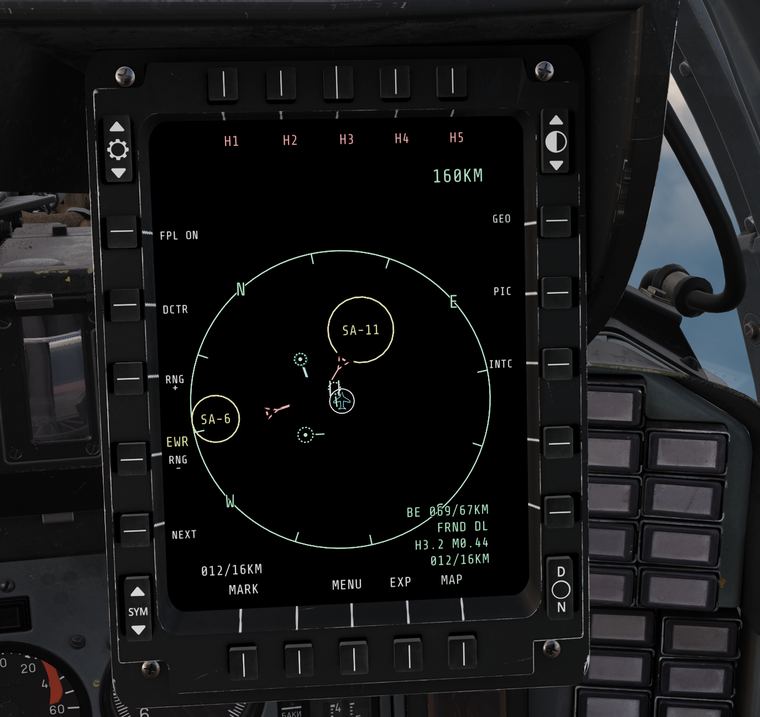
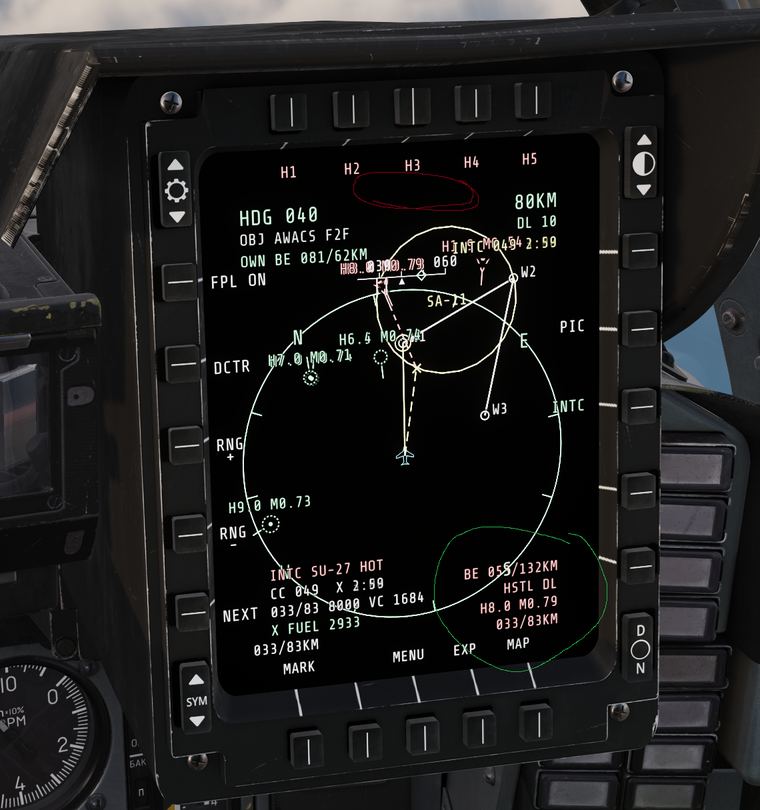
SA page: range circle with SA-11 and SA-6 threat rings, contacts and the flight's route
SL. 2SA page, 160 km, SA-11 and SA-6 rings

Situation awareness

A heading-up picture around your jet in the style of the F-15 SIT page. Friendlies, hostiles and your flight come over a simulated datalink built from what DCS exports, with sensor range, radar horizon and terrain taken into account.

  • Ground threats as rings, your route, markpoints and the cartridge's FLOT, borders and areas.
  • H1–H5 put the cursor on the nearest five hostiles; the datablock gives bearing, range, bullseye, altitude and type.
  • EXP zooms around a contact and follows it; the SYM rocker declutters in five steps.
  • On servers that block export, the server's EWR picture reports (NM or km) fill the page instead.
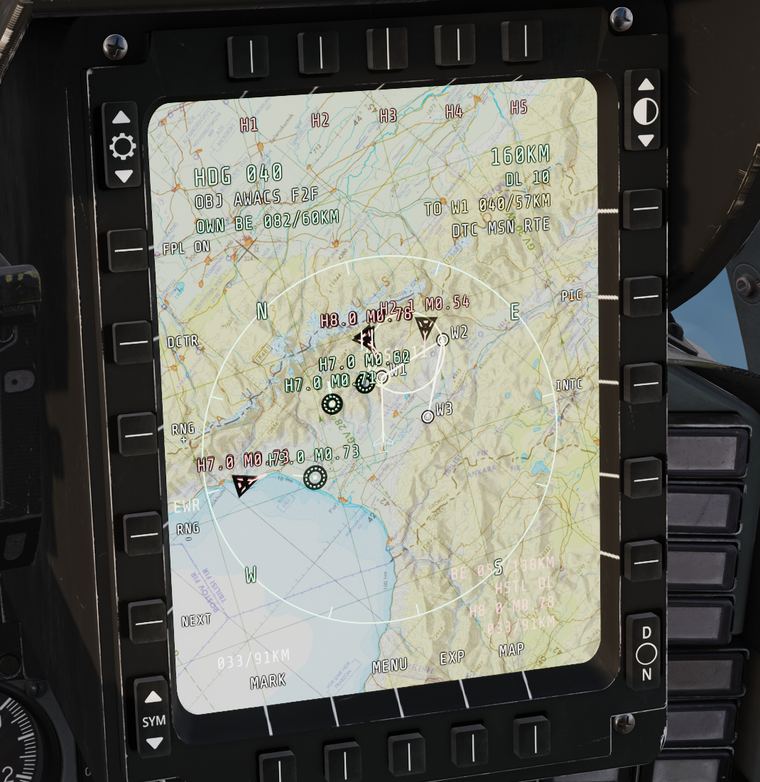
SA page over the DCS aeronautical chart of the Caucasus
SL. 3Moving map, Caucasus chart

Moving map

DCS's own aeronautical charts turn and slide under the symbols as you fly. Nothing is copied: the add-on reads the charts already in your DCS install, for Caucasus, Syria, Persian Gulf, Sinai, Iraq, Afghanistan, Nevada, the Marianas, South Atlantic, Germany Cold War and Kola.

One option in DCS's Special settings turns it on; in flight the MAP button dims it in two steps or hides it, and at night the chart dims a little more by itself.

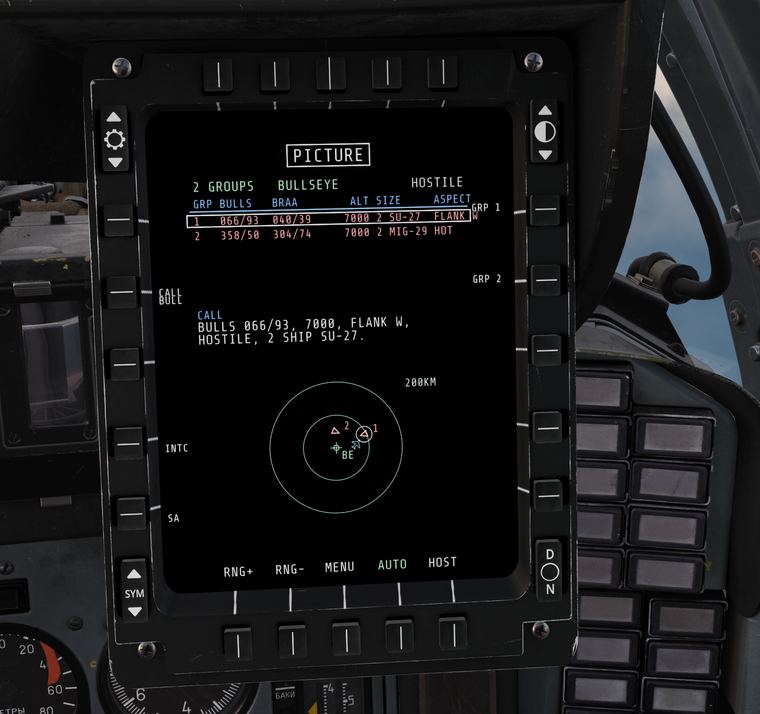
PICTURE page listing two hostile groups with bullseye, BRAA, altitude, size and aspect, a written call and a plot
SA page with intercept steering on an Su-27: collision course, time to intercept and fuel at the meeting point
SL. 4PICTURE page · SL. 5INTC on a hot Su-27

Picture and intercept

PICTURE groups the contacts into formations, nearest first, and writes the call out for you: BULLS 066/93, 7000, FLANK W, HOSTILE, 2 SHIP SU-27. CALL switches between bullseye and BRAA.

INTC solves the collision course to a target and puts it on a heading tape: steer the diamond to the centre and you meet head-on. The readout gives time to intercept, closure and the fuel you will have when you get there.

Advisory only: the autopilot, HUD, radar and weapons stay stock.

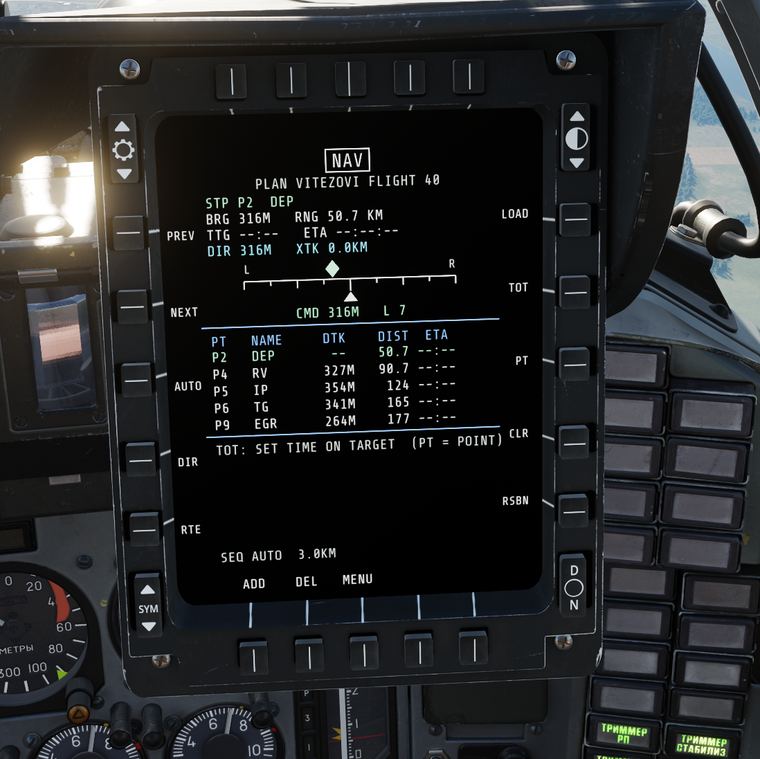
NAV page: steerpoint, bearing and range, steering bar with command heading and the route list
SL. 6NAV page, cartridge VITEZOVI FLIGHT 40

Navigation and time on target

The NAV page flies the cartridge's whole route, not just the jet's three waypoints. A steering bar gives the command heading back onto the planned leg, and every bearing on the SA page, HSI and UFCP is the same true value.

  • Times on target on any number of points, with the speed to fly on each leg and a speed cue.
  • One cartridge for the whole flight: tag points by member number and each pilot picks his route.
  • Typed-in waypoints in lat/long or MGRS, an EDIT page to move, re-position, add or delete any route point in flight, direct-to, auto sequencing and RSBN stations in range.
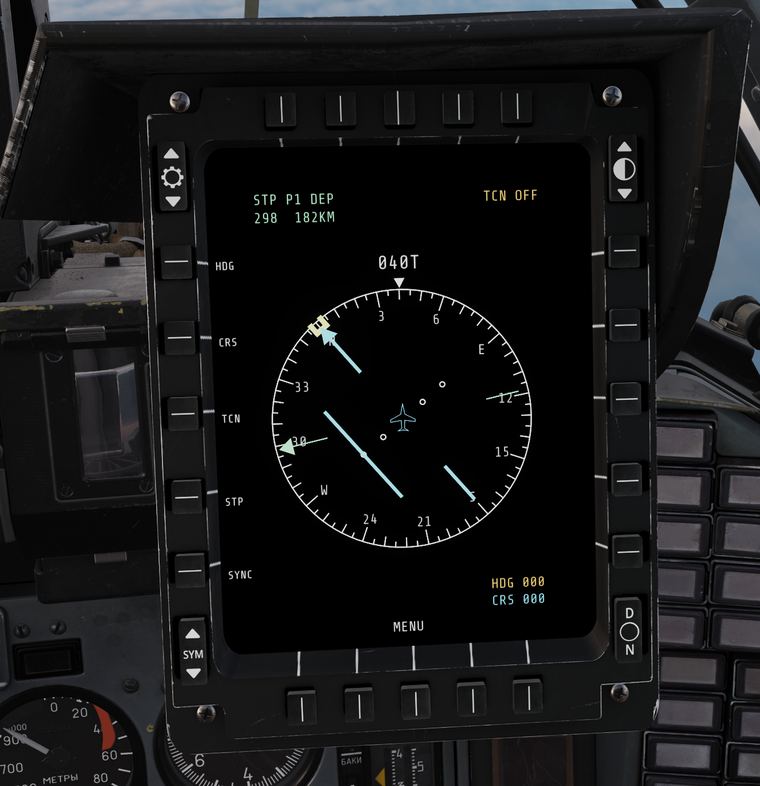
HSI page with compass rose, heading 040, course arrow and TACAN
SL. 7HSI

HSI

NATO-style HSI with heading bug, course and TACAN entered on the UFCP keypad.

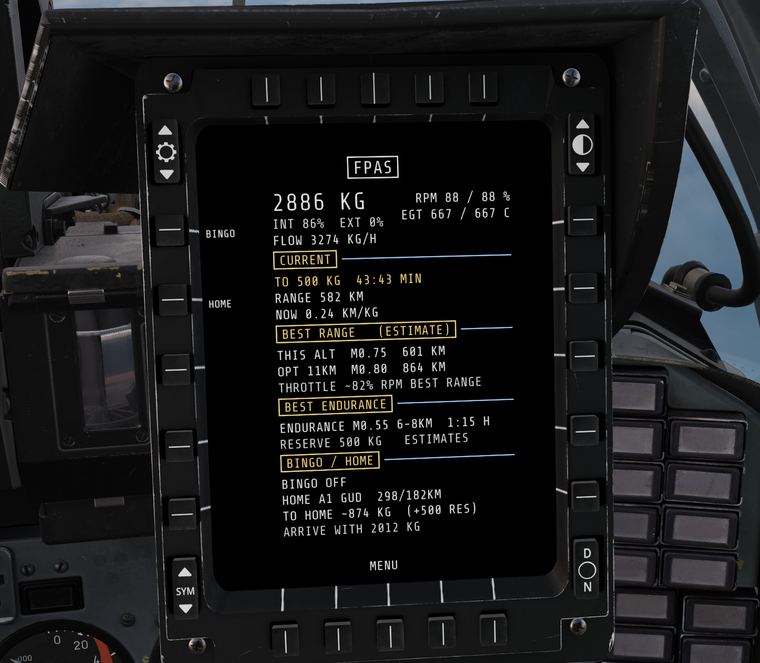
FPAS page: fuel 2886 kg, time and range to 500 kg, best range and endurance, bingo and home
SL. 8FPAS

Fuel planning

Fuel at the next steerpoint, range and time to the reserve, best range and endurance, bingo, and fuel on arrival at home, in kg or lb.

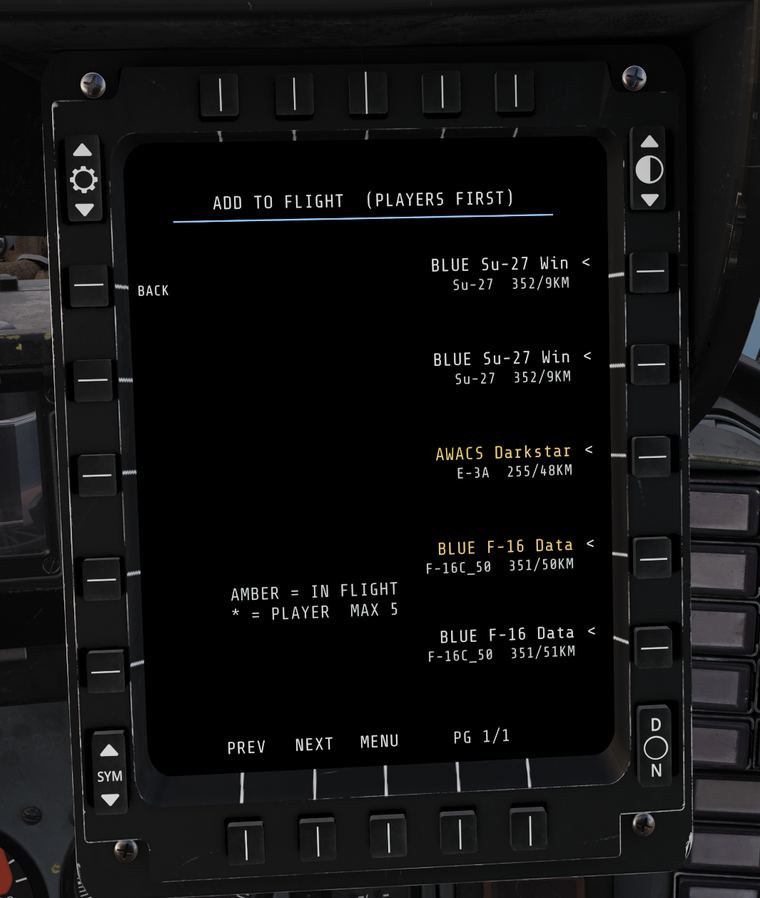
FLT page: adding friendly aircraft, players first, to your flight
SL. 9FLT

Flight, stores, RWR

Your flight's positions and status, every station's stores, the SPO-15 picture with launch warnings, and a LOFT page for rocket and bomb toss attacks.

Power-up

SL. 10 – SL. 12
Animated start-up: screen test grid, boot ROM text, software boot log and the squadron badge
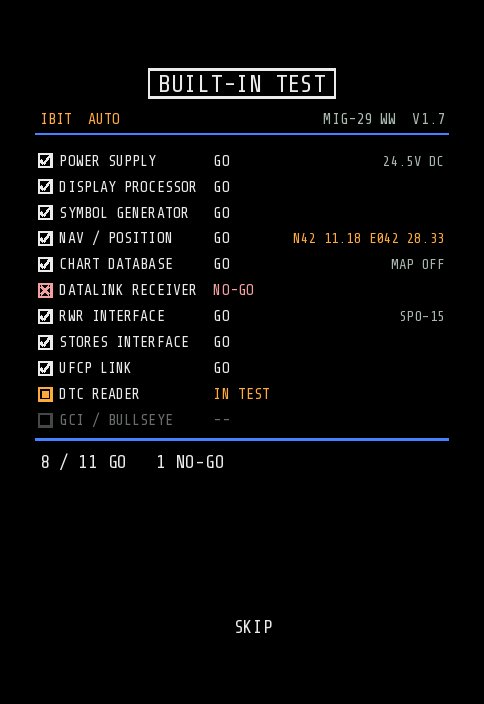
Built-in test checklist with GO lines and the aligned latitude and longitude
SL. 10Boot sequence · SL. 11Built-in test

A display that starts like a real one

The MFD runs on the jet's DC power. On a cold start it stays dark until the battery is on and you press PWR. Then it boots: screen test, boot ROM, software log, the squadron badge, a built-in test checklist with your aligned position, and the cartridge choice.

  • Hold PWR for 2 seconds, then let go to switch off; it cannot be knocked off by accident.
  • A short power blink keeps your page; a real power loss, like a rearm, means a full restart.
  • Hot and air starts come up already running.
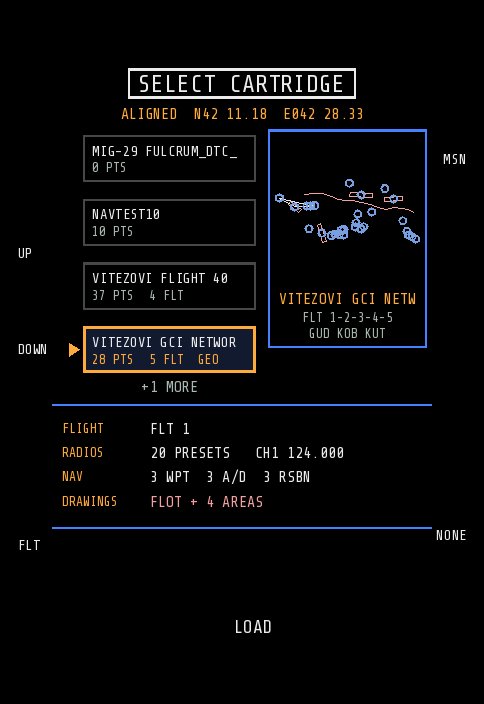
SELECT CARTRIDGE screen: cartridge cards, a route preview with points and FLOT, and what the cartridge holds
SL. 12Cartridge choice after the BIT

Cartridges and the DTC Planner

Pick the mission's data cartridge right after start-up: route preview, flight members, radio presets and drawings at a glance. Cartridges are DCS's own MiG-29 .dtc files, so the jet's navigation gets its waypoints, airfields and RSBN at the same time.

The Vitezovi DTC Planner comes with it: one offline HTML file with every DCS map built in. Plan routes, threat rings, FLOT and CAP areas, and save the cartridge with its drawings.

It also runs online, as the WW DTC Planner that makes the cartridges for the F-15C SIT (WW) and Su-27 Radio (WW) add-ons too: pick MiG-29A at the top.

Install

The add-on contains none of KRN's files. Its installer checks your copy of KRN's mod, keeps the originals and adds what the pages need. Uninstalling puts KRN's mod back exactly as it was.

  1. Install KRN's modMiG-29A(M) Cockpit Modernization V1.0.3 from KRN MODS (DCS User Files), into Saved Games\DCS\Mods\tech.
  2. Run INSTALL.batDownload the add-on, unzip it anywhere and double-click INSTALL.bat. Close DCS first.
  3. FlyBattery on, press PWR on the MFD's top-left rocker, choose a cartridge. The pilot manual explains every page.

Revisions

RevAdded
1.8.5COM/NAV: SRS radios 2 (VHF, ARC-186) and 3 (UHF, ARC-164) next to the R-862: 20 presets each, channel and volume buttons, frequency entry on the UFCP keypad, SYNC to SRS, 8 new binds; presets and channels kept between flights. Updated package 16 Nov: datalink no longer lost (NO DL BUSY) when SRS is not running; no more endless loading screen on big maps (sharpest chart only within 300 km of the spawn)
1.8.4New LOFT page (MENU right 5) for loft attacks with S-8 / S-24B rockets and FAB / OFAB / BetAB / RBK bombs on the steerpoint: range bar (MIN / OPT / MAX), pitch ladder with the release angle, PULL countdown for a 4 g pull, SHOOT (±50 m for bombs and S-24B) and IN RNG 500 m early for S-8 ripples and RBK, side view of the trajectory
1.8.3FPAS: the top row shows the fuel you will have at the next steerpoint and the time to get there (LOW when under the reserve); time and range to the reserve moved to the second row
1.8.2Lighter export: on busy servers the unit list is read every 2 to 6 s depending on what it costs; no unit list while no picture page (SA, FLT, PICTURE) or intercept is on the MFD; export chain fix (no more re-wrapping while a mission loads, at most 20 per mission)
1.8.1F/A-18 style heading tape back on the SA page (also used by INTC) and on the RWR page; RWR ring is now a compass turning with heading; SA header tidied: BE and range scale beside the tape, steerpoint as "W2 038/28", units only on the range scale
1.8.0Metric or imperial on the whole MFD, following the MiG-29's own Avionics Units option (NM, ft, kt, lb); map dimming on the MAP button (MAP, DIM, DARK, OFF; darker at night); EWR reports in metric units read too; INSTALL builds the map textures last
1.7.8EWR picture: servers that block export but send EWR picture reports now fill the SA page; spawn crash fixed with a moving map built by INSTALL from DCS's charts (whole map at every range); lighter export chain
1.7.7Night colours on D/N (fixed), STORES shows the selected pylon pair from the INBD/OUTBD switch, all options on by default incl. the moving map
1.7.6STORES page with the jet seen from behind, like the upgraded MiG-29; SA labels of stacked contacts grouped (SYM 2 / 3); SA cursor as a full square; next route points on the HSI
1.7.5Lighter: SA picture only worked out while SA is shown, less Lua garbage, export work spread over frames (about 1 ms each), busy servers read the unit list every 2 s; optional timing log
1.7.4HOTAS binds: every MFD and UFCP button in the MiG-29's own controls (category Vitezovi MFD), added by INSTALL.bat; unused cursor slew code removed
1.7.3Route editing: EDIT page to move, re-position, add and delete any route point while the active steerpoint stays; NEXT and the STP switch reach typed-in points
1.7.2Reliability update after a full code review: every button acts once on every PC, POWER off on release, settings.lua, own-slot mission cartridge, more maps
1.7.1POWER button fix for PCs that send the button's press and release with other values
1.7Display power from the jet, PWR button, boot sequence, built-in test, cartridge choice; published as an add-on to KRN's mod
1.6PICTURE page, INTC intercept steering, one true steering solution for every display, separate EXP zoom
1.5Threat rings, FLOT, borders and areas drawn from the cartridge
1.4NAV page with steering, member routes, typed-in waypoints, UFCP MRK / DIR / NAV keys
1.3Time on target with leg speeds and fuel at each TOT
1.2SA declutter, COM/NAV page, quick return to the last page
1.1RWR and stores pages, markpoints, bingo, launch and bingo alerts, moving map
127th Vitezovi FAS Wild Wolves squadron badge

MFD pages, start-up, datalink and DTC Planner: the 127th Vitezovi FAS "Wild Wolves".

MiG-29A(M) Cockpit Modernization (the MFD, UFCP and their model and textures): KRN MODS. DCS World and the MiG-29A Fulcrum: Eagle Dynamics. MFD font: Share Tech Mono (SIL Open Font License).